About Shapes 形について
Shapes seem like an obvious topic. Since they are ubiquitous, we take them for granted. Many tools provide ways to draw shapes, and many of them are pretty simple, like these functions in p5.js.
形は一見単純なテーマに見えます。形はどこにでもあるので、その存在を当たり前のように考えがちです。多くのツールが図形を描く機能を提供しており、下のp5.jsの関数のように、その多くはシンプルな仕組みです。
But as soon as we look more closely, things get complicated. In fact, there are infinite ways to define and draw shapes, and most of the shapes in the wild, from industrial products to nature, have so many nuances.
しかし、詳しく見ようとすると、物事はそれほど単純ではないことに気づきます。実際、図形を定義し描画する方法は無限にあり、工業製品から自然界まで、身の周りの形のほとんどには、様々な繊細な特徴があります。
Geometric Drawings
幾何学ドローイング
Let’s start with geometric shapes that are (relatively) easier to define mathematically and handle with code.
(比較的)数学的に定義しやすく、コードで扱いやすい単純な幾何学的図形から始めましょう。
It is easy to draw line segments, circles, etc. in various environments including HTML canvas. However, it is not so easy to draw figures like those in geometry textbooks. Even a simple operation such as drawing a circle around the intersection of two straight lines requires a bit of calculation. The ability to draw a picture and the ability to handle geometry mathematically are two different things. Of course, there are many well-designed libraries out there, but it is also a good learning experience to implement basic functions by yourself. Well it was at least for myself.
HTML Canvasを始めとする様々な環境では簡単に線分や円を描くことができます。ところが幾何学の教科書に出てくるような図形を描くのは意外と難しくて、2直線の交点を中心に円を描くといったシンプルな操作にもちょっとした計算が必要になります。絵を描く機能と数学的に図形を扱う機能は別物なのです。もちろん世の中にはよく出来たライブラリがたくさんあるのですが、自分で基本的な機能を実装してみるのも良い勉強になります(なりました)。
Understanding basic shapes gives us a foundation for drawing many other more complex shapes.
基本的な図形を理解することは、より複雑な図形を描くための基礎になります。
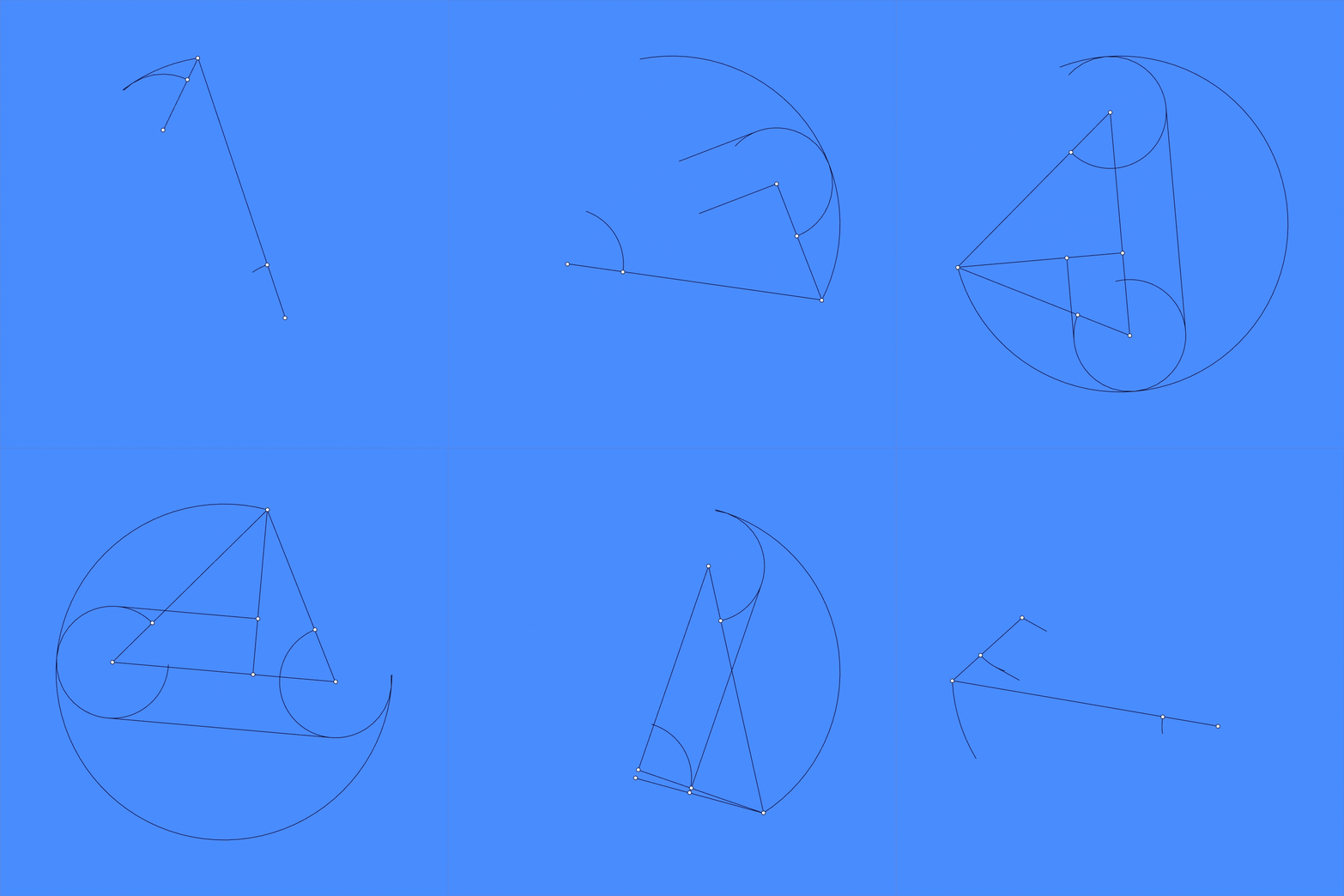
You might have experience in drawing shapes with just a compass and ruler in math class. It is sometimes fun to limit your tools and play within the constraints. It is fascinating to see we can create pretty complex shapes just with circles and lines.
数学の授業でコンパスと定規だけで図形を描いた経験があるでしょう。道具を制限し、その制約の中で遊ぶことには独特の楽しさがあります。円と直線という単純な要素だけで、驚くほど複雑な図形が作れることには驚きます。
Geometric shapes are widely used in our design. Repeating them in patterns is a major vocabulary of decorative and graphic design. Since ancient times, people have been crafting intriguing patterns by repeating graphic elements or organizing space based on specific rules.
Detecting Collision
衝突判定
Not just for directly drawing shapes, we often use geometric shapes as proxies for more complex shapes as well. A good example of this is collision detection in games and 3D simulations where we want to detect object intersections. We usually use basic shapes like circles, triangles, rectangles, and combinations of them to approximate complex shapes at different precisions as needed. If you’re making a NES game, Mario can be just a rectangle. If you’re making a 3D fighting game, you might want boxes to represent a character’s body, upper and lower arms, fists, etc. separately.
幾何学的な形状は、形を直接描く以外にも、より複雑な形状の代用としてよく使われます。良い例はゲームや3Dシミュレーションでの衝突判定で、オブジェクトどうしの重なり検出したい場合です。円、三角形、長方形などの基本的な形状やその組み合わせを使うと、必要な精度に応じて複雑な形状を近似できます。例えば、(初代)ファミコンゲームを作るなら、マリオを単純な長方形で表現できますが、3D格闘ゲームを作りたければ、キャラクターの体、上腕、下腕、拳などを個別のボックスで表現する必要があるかもしれません。
A human can tell if two figures overlap or not at a glance. But it is difficult to solve this generally with a computer, and different problems often require different tricks.
2つの図形が重なっているかどうかは人間ならば一目でわかります。ところがこれをコンピュータで一般的に解くのは難しく、問題によって様々なトリックが必要になります。
Various methods of checking whether figures overlap are used to detect collisions between objects in physics simulations and games. You may rely on the functions of existing tools and libraries in actual projects. But knowing the basics will not only help you understand these tools but will also enable you to quickly implement only the functions you need yourself.
図形が重なっているかを調べる様々な手法は物理シミュレーションやゲームなどで物体同士の衝突判定に使われます。実際のプロジェクトでは既存のツールの機能やライブラリなどに頼ることも多いと思いますが、基本的なことを知っておくと、これらのツールを理解する役にたつだけでなく、自分で必要な機能だけを素早く実装できるようになります。
The linked page above (Detecting Collision 衝突判定) only covers collision detection in 2D. 3D collision detection can be much more intricate, but understanding in 2D can extend and help a lot in 3D too. Below is a simple reference I found for 3D.
Curves
曲線
While straight lines are much easier to handle, curves are the norm on Earth. Nature doesn’t have many straight lines. Almost nothing goes straight, except for light. Curves are obviously a very essential tool for sketching. However, unlike straight lines, which can be defined with just two points and a linear formula, curves have infinite possibilities and are much harder to handle. There have been many different methods of defining or drawing curves, each with its own advantages, disadvantages, and constraints.
直線の方が扱いやすいのですが、地球の上では曲線が標準です。直線は自然の中にはあまり存在せず、光をのぞいて直進するものもほとんどありません。当然ながら曲線はスケッチにおいて非常に重要ですが、2点と線形の方程式で定義できる直線に対して曲線には無限の可能性があるため、扱いがはるかに難しくなります。曲線を定義したり描画するためには様々な方法があり、それぞれに、利点、欠点や制約があります。
Cumulative Curves
積み重ねによる曲線
One of the most common ways that curves occur in the physical world is through cumulative motion or buildup, meaning a point starts moving from one location and changes its course over time. This can include freehand drawing, paths followed by insects, animals, vehicles, and the growth patterns of plants and other organisms.
物理的な世界で曲線が生まれる最も一般的な形の1つは、累積的な運動や蓄積、つまり何かがある地点から動き始め、時間とともにその進路を変えながら進んでいくことです。これにはフリーハンドの描画、昆虫、動物、車両が辿る経路、または植物や他の生物の成長パターンなどが含まれます。
Parametric Approaches パラメトリックアプローチ
While the cumulative approach is straightforward and versatile in theory, it is often not the best for many practical use cases where you want more precise control over the overall shape and details, such as in drawing or design tools.
積み重ねによるアプローチは理論上は素直で汎用的ですが、描画ツールやデザインツールなど、実際の利用シーンで、全体の形や細部をより正確に制御したい場面では必ずしも最適ではありません。
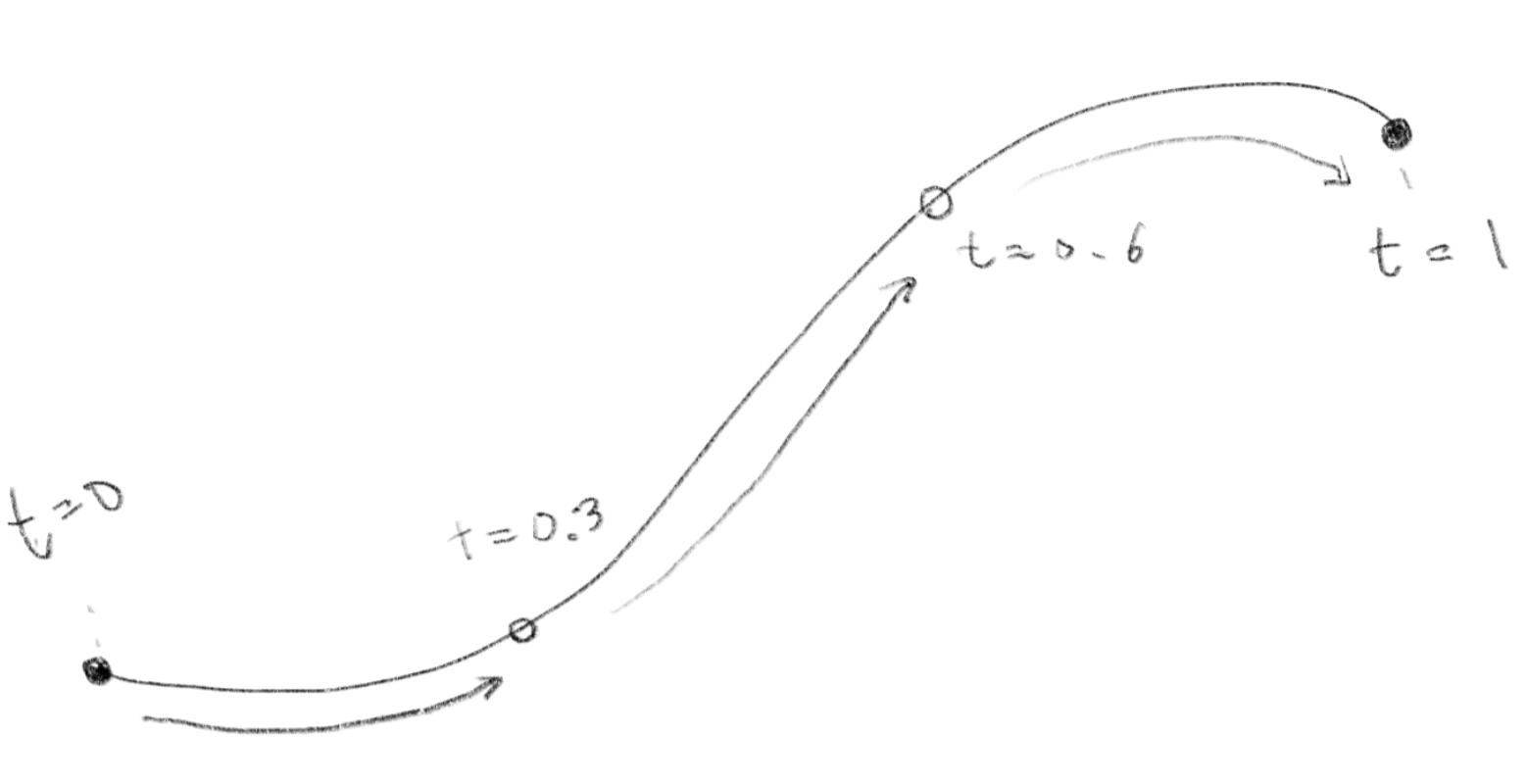
These tools usually adopt parametric approaches. In the parametric approach, a shape or curve is defined mathematically using one or more parameters. By varying these parameters, you can generate points that make up the shape. For example, if the parameter is called , you can get all the points from beginning to end by moving within a certain range.
これらのツールは大抵、パラメトリックなアプローチが用いられます。パラメトリックアプローチでは、形や曲線は1つまたは複数のパラメータを使って数学的に定義され、これらのパラメータを変化させることで、形状を構成する点を生成します。例えばパラメータを とすると、この を といった一定の範囲内で変化させることで、始めから終わりまでのすべての点を取得することができます。
Parametric Approaches パラメトリックアプローチ
Bézier and Spline
ベジェとスプライン
Among parametric approaches, there is a category of methods that are designed to define curved lines freely and precisely with multiple control points. These methods are widely used in design tools such as Adobe Illustrator or Figma, CAD, 3D modeling tools, and others.
パラメトリックアプローチの中には、複数の制御点を使って、自由かつ正確に曲線を定義する手法のカテゴリーがあります。これらの手法は、Adobe IllustratorやFigmaなどのデザインツールや、CAD、3Dモデリングツールなどで幅広く使用われています。
A spline curve is a mathematically defined curve that smoothly passes through or is close to a series of control points. It is like a big family, and there are many variations including Bézier curves, B-spline curves, NURBS (Non-Uniform Rational B-Splines), Cardinal Splines, Catmull-Rom Splines, Hermite Splines, etc.
スプライン曲線は、滑らかに一連の制御点を通過するか、またはその近くを通過するように数学的に定義された曲線です。これは大きなファミリーのようなもので、例えば、ベジェ曲線、Bスプライン曲線、NURBS(Non-Uniform Rational B-Splines)、カーディナルスプライン、Catmull-Rom スプライン、エルミートスプラインなどに様々なバリエーションがあります。
Controlling curves
曲線のコントロール
When we talk about shapes, it is important to discuss their quality, not just methods, since after all, we are sketching to express something. Curves can have various visual characteristics. For example, some curves might look more organic and natural, while others might appear more geometric and mechanical. How can we create these different looks of curves?
結局のところスケッチは何かを表現するためなので、形について語るときには手法だけでなく、その質について議論することが重要です。曲線には多様な見た目の特徴があります。例えば曲線には有機的で自然に見えるものも、より幾何学的で機械的に見えるものもあります。これらの異なる曲線の見た目はどうしたら作れるのでしょうか。
Signed distance functions
符号付き距離関数
There is another very different category of defining shapes than drawing outlines.
輪郭線を描くのとは全く異なる、形状を定義する手法のカテゴリーがあります。
“Signed distance functions”, or SDF sounds scary but it is not too crazy to understand. A SDF is a function that can tell you how far a point is from a surface of a shape, say a sphere (usually in Euclidean space)
「符号付き距離関数」(“Signed distance functions”、略してSDF)とは怖そうな名前ですが、実は割とシンプルです。SDFとは、ある点がある他の形の表面、例えば球面から(通常ユークリッド空間で)どのくらい離れているかを教えてくれる関数です。
For example the distance of a point from the surface of a sphere can be expressed as below where is the coordinate of the point, is the center of the sphere, and is the radius:
例えば、ある点が球の表面からどれくらい離れているかは、その点の座標を、球の中心を、半径をとすると、次のように表すことができます。
Signed distance functions 符号付き距離関数
This is very interesting because SDF is the technique used as basis for many mind-blowing 3D graphics demos with really small amount of code you often find on ShaderToy.
なぜこれが面白いかというと、SDFはShaderToyでよく見かける、短いコードで凄まじいクオリティの3Dグラフィックを実現するデモの背景にある技術だからです。
3D rendering with SDF
Using this method in 3D, you can create different shapes pretty flexibly with a relatively short amount of code using shaders.
この手法を3Dで使うと、比較的短いシェーダーのコードで様々な形状を柔軟に作ることができます。
Projection and 3D Rendering プロジェクションと3Dレンダリング
Reading “Raymarching - Primitives”
Shaders and 3D rendering have a very steep learning curve. There isn’t a common or obvious way to build knowledge step by step, and it takes learning from multiple resources and examples. Shadertoy is one of the best resources with tons of cool demos with publicly available code. However, understanding this demo code can often be daunting. There are many techniques to grasp, and it’s often difficult to understand what’s happening in the code at first glance.
シェーダーと3Dレンダリングの学習は険しい道のりです。知識を体系的に積み上げる定番の方法はなく、多様な資料や例を参考に学ぶ必要があります。Shadertoyは最良のリソースの一つで、数多くの優れたデモがコード付きで公開されています。しかし、そのデモコードの理解は往々にして困難です。習得すべきテクニックが多岐にわたり、一見しただけではコードの動作を把握するのが難しいことも少なくありません。
There isn’t really a shortcut here (as far as I know). Studying demo codes step by step, a little by little is the best way. Two following pages are my attempt to help with the journey.
(知る限り)ここに近道はありません。デモコードを一歩一歩、少しずつ学んでいくのが最も確実な方法です。下の2つのページは、学習の手助けのための試みです。
Reading “Raymarching - Primitives”
Noise and Fractal
ノイズとフラクタル
The landscape example just above shows a lot more intricate and organic shape than other shapes we have been seeing so far.
上の風景の例は、これまでに見てきた他の形状と比べて、ずっと複雑で有機的な形をしています。
Many naturally occurring shapes follow a pattern called a fractal, where a shape repeats its structure at different scales. In fractals, parts of the shape resemble the whole, while smaller parts resemble the larger parts.
自然に存在する多くの形状は、フラクタルと呼ばれるパターンに従い、様々なスケールで同じような構造が繰り返されます。フラクタルの特徴は、形状の一部が全体と似た性質を持ち、さらにその小さな部分がより大きな部分と似た形を示すことです。
This property, called self-similarity, is key to modeling many complex structures and patterns found in nature, such as coastlines, mountains, clouds, and tree branches. Objects and lives in nature often to form fractal-like structures in the process of building themselves, where similar patterns recur at progressively smaller or larger scales. Understanding this principle can help us sketch them.
この性質は自己相似性と呼ばれ、海岸線や、山、雲、木の枝など、自然に見られる多くの複雑な構造やパターンをモデリングするため重要な概念です。自然界の物体や生命は、自己を構築する過程でしばしば、同様のパターンがより小さな、または大きなスケールで繰り返し現れる、フラクタルのような構造を形成します。この原理を理解することは、これらの現象をスケッチする役に立ちます。
Natural shapes are also unpredictable. The ups and downs of terrain, the changes in temperature, or the directions animals wander towards all seem random, but they look smoothly connected too, and values next to each other seem to be somehow related. Noise functions are the go-to methods for this, and we often overlay multiple layers of noise functions in a fractal manner (scale and add) to get desired complexity.
自然の形は予測できません。地形の起伏、温度変化、動物の移動方向などはランダムに見えますが、滑らかにつながっており、隣接する値には関連性があります。ノイズ関数はこの性質を表現するための定番の手法です。必要な複雑さに応じて、フラクタル的な方法(スケーリングと加算)で複数のノイズ関数を重ね合わせて使うことがよくあります。
Exploring more shapes
As I said in the beginning, there are infinite ways of defining and drawing shapes. A couple of major topics I didn’t touch upon are:
-
Polygons: I guess you know almost all 3D gaming characters are made of a bunch of triangles. Defining 3D shapes as a collection of tiny polygons (usually triangles but can be quads or other shapes) is such a common method. I didn’t cover them because it takes a lot to support 3D rendering with polygons. Studying a well-designed library or tool, such as three.js, is a good start, and there are plenty of books and tutorials.
-
Manual drawing and modeling: Many of human made shapes are of course made by hands, literary or figuratively. People have been drawing and sculpting shapes by hands for ages, and there are equivalents in digital tools. Covering drawing tools and modeling tools and keeping up with their frequent changes are completely beyond my scope.
最初に言った通り、形状を定義したり描いたりする方法は無限にあります。下はここで触れなかった重要なトピックのうち2つです。
-
ポリゴン: ご存知の通り、3Dゲームのキャラクターのほとんどはたくさんの三角形でできています。3D形状を小さなポリゴン(通常は三角形ですが、四角形やその他の形も可)の集合として定義する方法はとても一般的ですが、ポリゴンを使用した3Dレンダリングをサポートするのは大仕事なので、ここでは詳しく説明しませんでした。three.jsのような優れたライブラリやツールを学ぶことから始めるのが良いでしょう。多くの書籍やチュートリアルがあるので利用しましょう。
-
手書きやモデリング: 人工的な形状の多くは、文字どおりあるいは比喩的な意味で、手作業によって作られます。人類は古くから手で形を描き、作り出してきましたし、現代のデジタルツールにも同様の機能が備わっています。しかし、さまざまな描画ツールやモデリングツールを解説し、その頻繁なアップデートに追従することは、ここでも守備範囲を大きく超えています。
That said, if you’re interested, I recommend building basic tools yourself to learn the fundamentals. Even trying to render a few polygons can provide good insights (hint: project 3D points to 2D screen, calculate normals using cross product of vectors, and apply lighting).
興味があれば、基礎を学ぶために基本的なツールを自分で作ってみることをお勧めします。数個のポリゴンをレンダリングしてみるだけでも、多くの気づきが得られるでしょう(ヒント:3Dの点を2Dのスクリーンに投影し、ベクトルのクロス積を使って法線(ノーマル)を求め、ライティングを適用します)。