Repetition 繰り返し
At the basis of patterns is repetition. We recognize patterns because the same thing happens again and again. What “the same” means can vary to a great extent though. Sometimes it’s as simple as counting numbers, 1, 2, 3, 1, 2, 3. If you think about how your days go, or seasons; no two days are exactly the same, but there is a clear sense of repetition and patterns. Some patterns are even more abstract. For example, many stories from folklore to Star Wars episodes follow similar patterns. Christopher Booker argued there are seven basic plots in his book.
パターンの大元には繰り返しがあります。人は同じことが何度も起こるとパターンを認識するのです。しかし、この「同じ」が持つ意味には、非常に大きな幅があります。1, 2, 3, 1, 2, 3と数を数えるように単純な場合もあるでしょう。一方、日々の過ごし方や季節について考えたると、2つの日がまったく同じことはないのに、そこには明確な繰り返しとパターンの感覚があります。もっと抽象的なパターンもあります。たとえば、民間伝承からスターウォーズのエピソードまで、多くの物語には繰り返される類似のパターンがあります。Christopher Bookerは彼の本の中で基本的な物語のプロットには7種類あると主張しました。
What we will look at on this page are the numerical and mathematical ways of creating repetitions that you can use to sketch in code, starting from the very basic 1, 2, 3, example.
このページでは、基本的な1, 2, 3の例に始まり、コードを用いたスケッチに使える、数値的、数学的に繰り返しを作り出す方法を見ていきます。
Modulo モジュロ
You can use modulo to create a repeating sequence of numbers. Modulo is basically a mathematical way of saying “count to then go back to one and repeat”. Think of a drum pattern in which the kick drum strikes every four beats, or the days of the week that repeat every seven days. Repeating numbers can represent different things.
繰り返しの数列を作るにはモジュロが使えます。モジュロは簡単にいうと「まで数えたら1に戻り繰り返す」ことを数学的に表す方法と言えます。4拍ごとのキックドラムが鳴るドラムパターンや、曜日が7日ごとに繰り返す様子を思い浮かべてください。繰り返す値はさまざまなものを表現することができます。
To calculate a modulo, you can divide a number with another number and take the remainder.
モジュロを計算するには、ある数を別の数で割り、その余りを取ります。
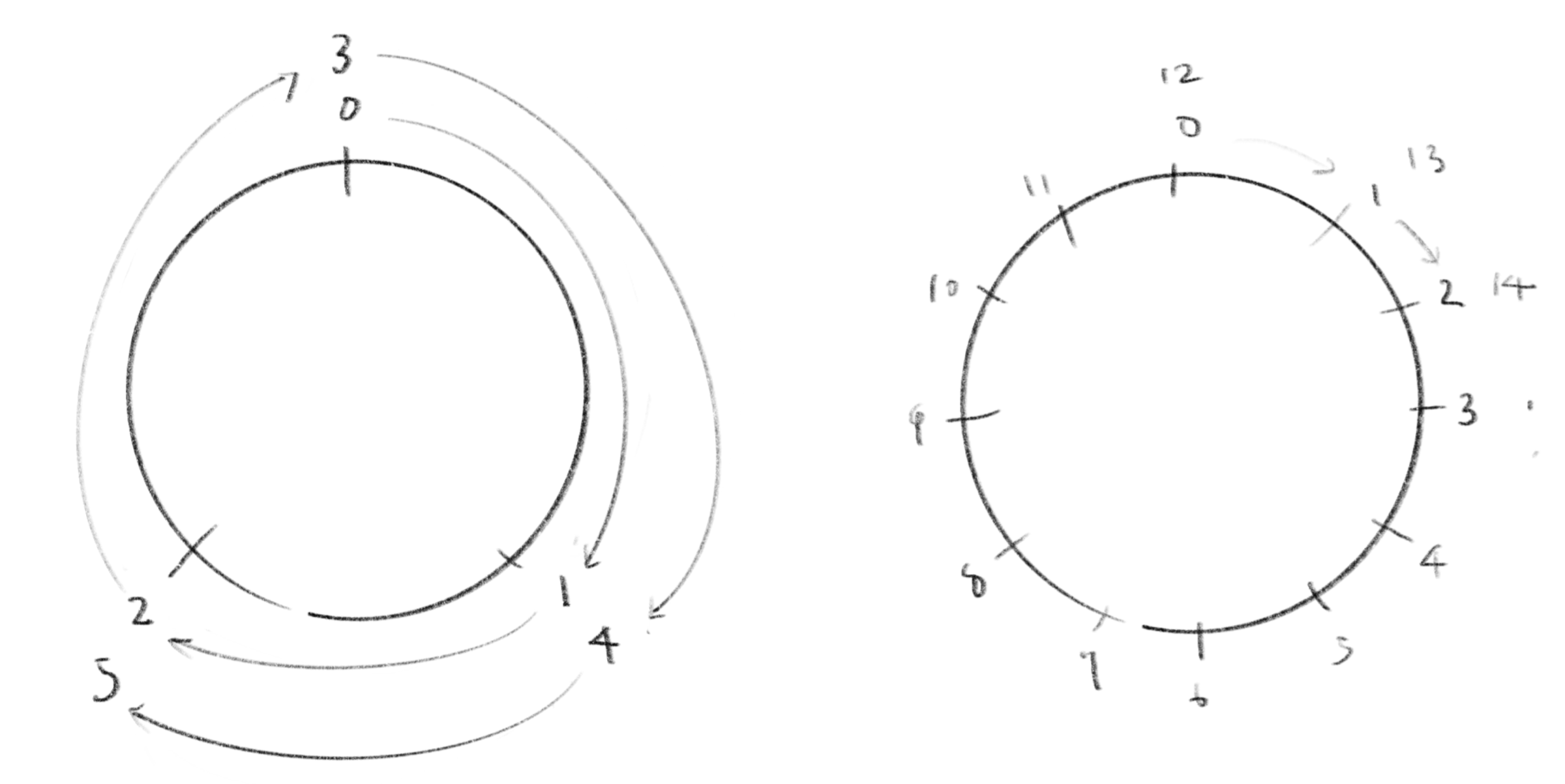
You can also imagine it as a circle like a clock. Instead of a number line extends towards infinity, you circle around and return to the same point after steps. The modulo operation relates two numbers based on their division remainder. For instance, the days of the week operate in mod 7. You can say that 8 and 15 are equivalent modulo 7, which means that the 8th and 15th of the same month fall on the same day of the week. Or, the keys on a piano are in mod 12, which means if you go up or down from a certain note (let’s say C), you come to the same note after 12 half-note steps. In , is called the “dividend” and is called the “modulus”.
時計のような円を思い浮かべてもいいでしょう。無限に向かって伸びていく数直線ではなく、ステップ後に同じ点に戻る円を考えます。モジュロ演算は2つの数値を、割り算の余りに基づいて関連付けます。例えば、週の曜日は mod 7 です。mod 7では8 と15 が同じ値になりますが、これは、同じ月の8日と15日が同じ曜日になることを意味します。ピアノの鍵盤はmod 12で、これはある音(例えばド)から初めて上か下に進むと半音12個で同じ音に戻ってくることを表します。
のは「被除数」と呼ばれ、は「除数」と呼ばれます。
数学の本では、mod 7で8と15が同じ値になることを「8と15は7を法として等しい」、「7の方では8と15は等しい」などと言います。
In Javascript, you can use % for modulo. For example, can be written as 4 % 2.
JavaScriptでは、%を使ってモジュロを計算できます。例えば、は4 % 2と書けます。
Be careful that
%is not exactly the same as modulo.%returns negative results for negative input numbers; for example, while is 1 in math,-5 % 2returns-1. To work around this, you can either add a multiple of the modulus to the dividend to ensure it is positive, or add the modulus to the result if the initial result is negative.厳密には
%はモジュロと異なるので注意してください。%は負の入力に対して負の値を返します。たとえば、数学では は1ですが、-5 % 2は-1を返します。被除数に除数の倍数を足して正の値にするか、結果が負の場合に除数を足すことでこれを修正することができます。
The demo below arranges different modulos in order from mod 1, mod 2, to mod 3, etc. The cells with a value of 0 are filled in black.
以下のデモでは、mod 1、mod 2、mod 3などの異なるモジュロを順番に並べて、値が0のセルを黒で塗りつぶしています。
The demo from the resolution page uses modulo to create repeating drum patterns. Click on the canvas to toggle between different beats.
解像度のページのデモでは、ドラムパターンの繰り返すためにモジュロを使っています。キャンバスをクリックするとビートを切り替えることができます。
Repetition of Continuous Numbers 連続する値の繰り返し
The modulo is a great way for creating a repetition of discrete numbers. Then a natural next step would be to think of a continuous version of the idea. A simple way to do this is by taking the fractional part of a continuously increasing number. In Javascript this can be easily implemented as below.
モジュロは、離散的な数の繰り返しを作る方法でした。自然な流れとして、この考え方を連続的な値に当てはめてみましょう。簡単な方法は、連続的に増加する数値の小数部分を取ることです。Javascriptでは、以下のように簡単に実装できます。
function fract(x) {
    return x - Math.floor(x);
}
or in mathematical notation, you can write this as:
数学の記法では下のように書くことができます。
With this function, you can obtain a series of repeating numbers between 0 and 1 (0 ≤ x < 1) at any resolution. If you want a different range, you can easily adjust it by multiplying the number to scale, or adding a number to shift. Take a look at the graph below to see what this does.
この関数を使用すると、任意の解像度で0から1までの(0 ≤ x < 1)の値を繰り返す数列が得られます。異なる範囲の値が必要なら、掛け算を用いて拡大縮小したり、足し算を使って範囲をずらすなど簡単に調整できます。この手法で何ができるか、下のグラフで実際に見てみましょう。
This may not very look interesting by itself, but the point is that you can use these repeating numbers as a basis to create more complex shapes and patterns. For example, you can apply different easing function to deform the shape of the slopes.
これだけだと対して面白くないかもしれませんが、重要なのはこの繰り返しの数が、より複雑な形状やパターンを作る基として使えることです。例えば、様々なイージング関数を用いてスロープの形を変形できます。
And wrap it around a shape, for example a circle.
これを何かの形、例えば円の周りに巻きつけてみましょう。
You can use various functions to create different shapes, or use the data to drive anything, such as the gradient of colors or motion. Below are some additional examples of functions that you can use for deformation.
さまざまな関数を使って異なる形を作成したり、色のグラデーションやアニメーションなど、どんなものにもデータを当てはめることで、様々な応用が考えられます。下は変形に使える関数の追加の例です。
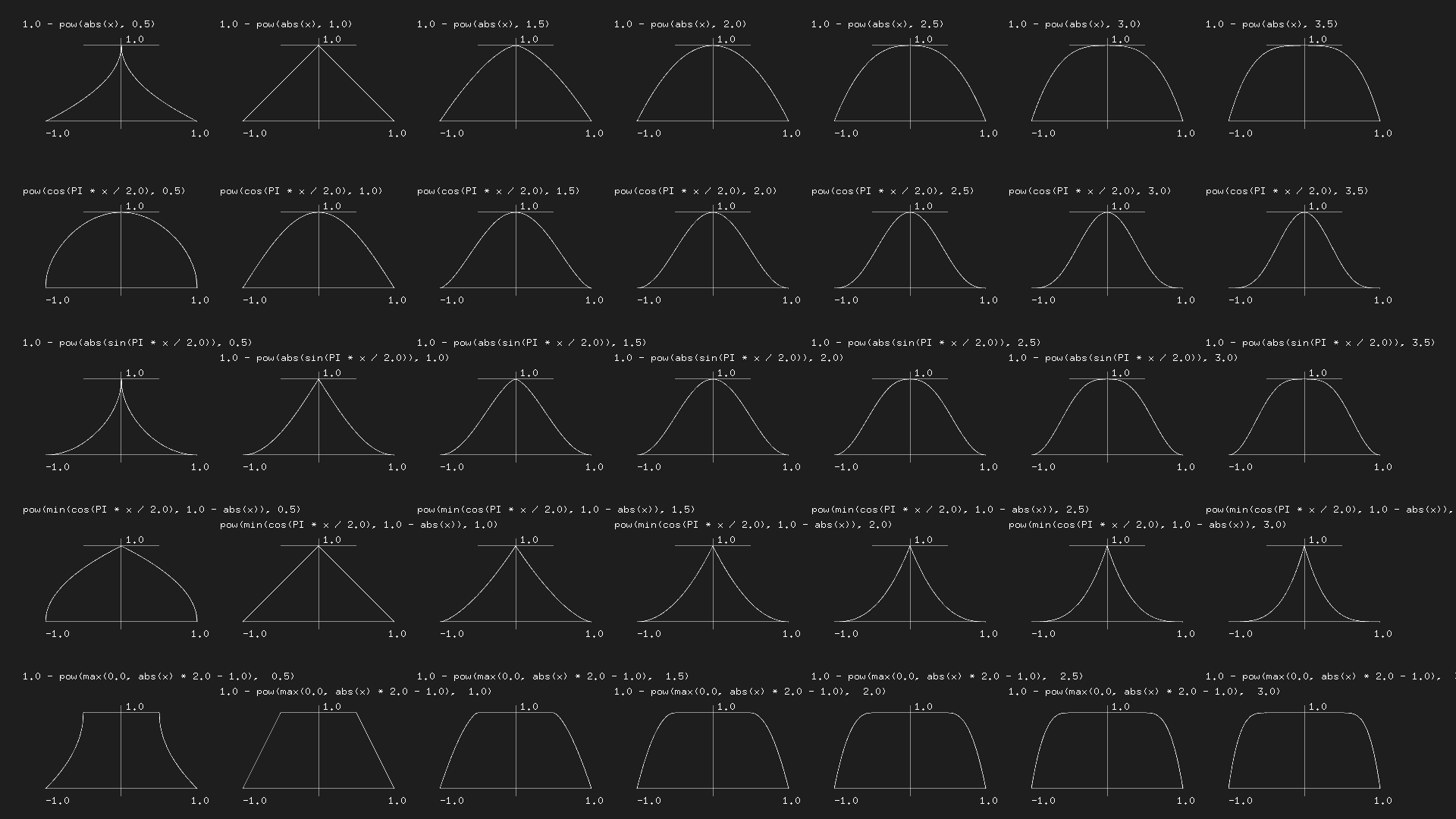
These functions are illustrated for the range between - 1 and 1, while
fract()returns the value of 0 ≤ x < 1. But you can easily map the number with(x - 0.5) * 2or, in general, to any range betweenaandbwitha + x * (b - a).
これらの関数は-1から1の範囲で描かれていますが、fract()が返す値は 0 ≤ x < 1 です。 式x * 2 - 1を使うとこれを簡単にマッピングできます。より一般には、aからbの任意の範囲に対して、a + x * (b - a)が使えます。
Sine waves サイン波
Another way to create a repeating pattern of continuous numbers is to use the sine function. We have seen many examples talking about wave and sound (wave is one of the most canonical example of a pattern we see in nature)
連続した値の反復パターンを作るには、サイン関数を使うこともできます。これについては、波や音について調べる際に多くの例を取り上げました(波は自然界で見られるパターンの最も典型的な例の一つです)。
Sine waves and Additive Synthesis サイン波と加算合成
The example below uses the sine function to draw a 2D pattern. It multiplies two sine waves along the x-axis and y-axis, then applies another sine function to threshold the value. This makes the pattern oscillate between a solid checker pattern and a blurry gradient.
下の例では、サイン関数を用いて2次元のパターンを描いています。x軸とy軸に沿って2つのサイン波を掛け合わせ、その後に別のサイン関数を出力のための閾値として適用します。これによりパターンははっきりとしたチェック模様とぼんやりしたグラデーションの間を行ったり来たりします。
After all, what you get from these methods are just sequences of repeating numbers, and there are infinite possibilities about how to use them. Be creative and explore different ideas.
究極のところ、これらの方法は繰り返しの数列を生み出すだけなので、使い道にはについては無限の可能性があります。創造力を持って様々なアイデアを試してみましょう。
Just as examples, try thinking about how you could visualize and animate the following motifs.
-
A stop-frame animation or a character that repeats finite frames
-
A heartbeat with a line that rhythmically pulsates
-
A day-to-night cycle of the sky
-
Kaleidoscopic graphics that repeat patterns around the center
-
A wallpaper pattern that consists of multiple tiles
例えば、下のモチーフをどのように視覚化したり、アニメーションできるか考えてみましょう。
-
数フレームを繰り返すだけのコマ撮りキャラクターアニメーション
-
リズミカルに脈打つ心電図のライン
-
昼と夜を繰り返す空
-
中心軸の周りにパターンを繰り返す万華鏡のようなグラフィック
-
複数のタイルで構成される壁紙のパターン
On the next page, we will explore how to repeat shapes or divide a space into shapes to create graphical patterns.
次のページでは、形を繰り返したり、空間を形状に分割してグラフィカルなパターンを作成する方法について見ていきます。