Vector Operations ベクトルの操作
This page covers various operations on vectors.
下記ではベクトルに対する様々な操作を取り上げます。
These calculations are sometimes too abstract to grasp by looking at the definitions. They often only start to make sense when you actually use them. This page is not meant to be read through, but rather to be linked from other places when explanations are needed. For a brief introduction to vectors, see this page.
こうした計算は抽象的で、定義を見ただけではよくわからないことがあります。実際に使ってみると、何となく意味が見えてくることが多いものです。このページは読み物ではなく、他の場所で説明が必要になった時にリンクするために作りました。ベクトルについての簡単な紹介はこちらのページを見てください。
THE NATURE OF CODE is also highly recommended as a reference.
THE NATURE OF CODEもおすすめです。

If you want to learn deeper about vectors and related areas through programming, this book might be interesting for you.
ベクトルや関連する分野についてより深くプログラミングを通して学びたい方には、下記の本が良いかもしれません(日本語版)。


Addition
足し算
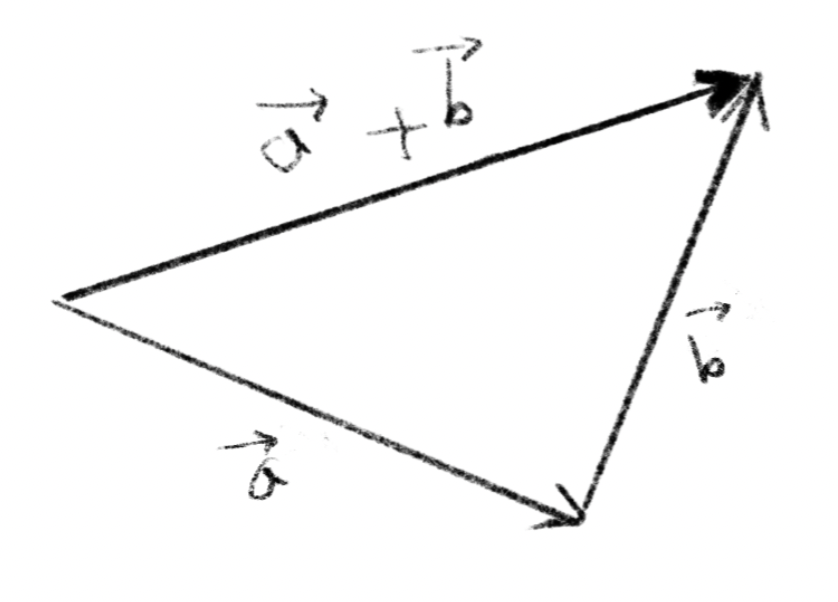
Vectors can be added and subtracted. To calculate this, you can simply add or subtract corresponding components. This picture illustrates what it means spatially. Assuming vectors are arrows, if you follow , then , the vector from the starting point to where you end up is the .
ベクトルは足し算や引き算ができます。単純に対応する成分どうしを足し引きします。このように絵に描くと空間的な意味もわかりやすいでしょう。ベクトルを矢印と考えて 、それから に沿って進むと、出発点からその点までのベクトルが になります。
Magnitude
大きさ
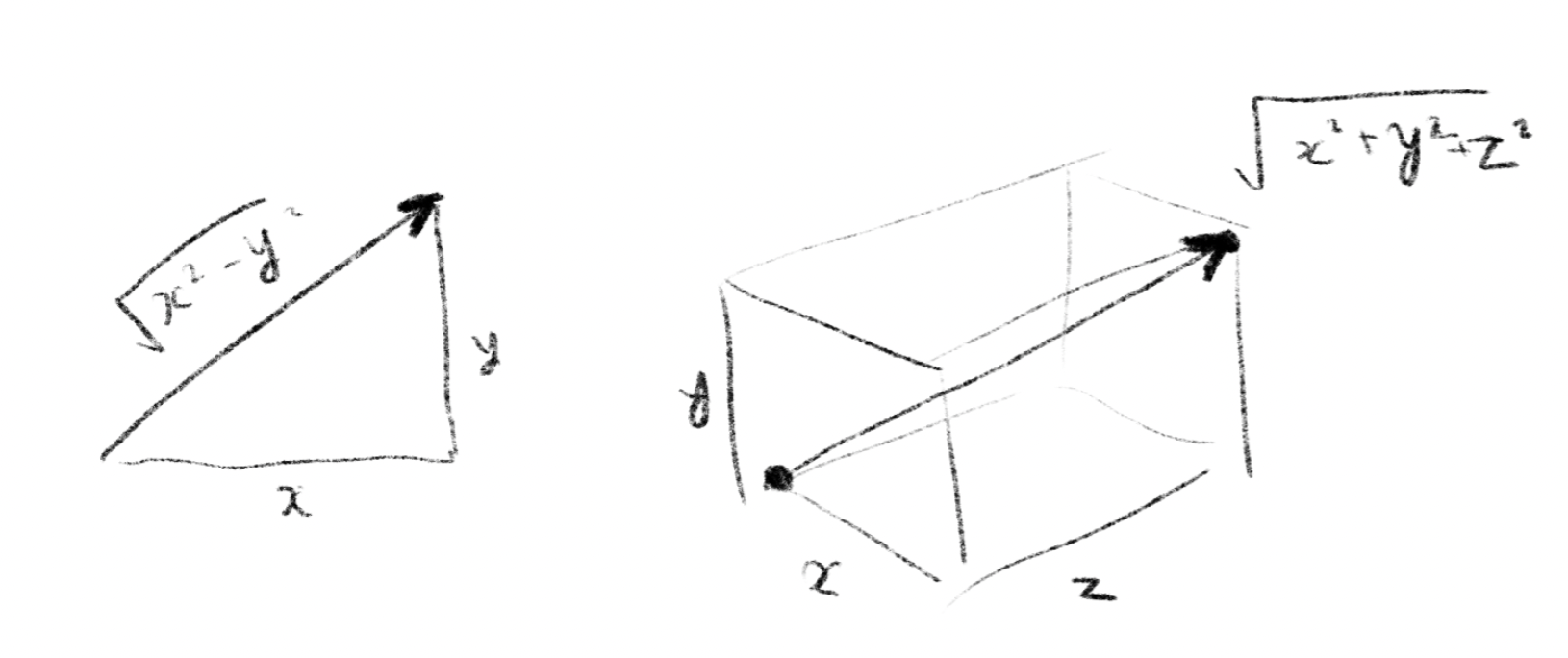
(In Euclidean space) The magnitude of a vector is the square root of each component squared and added together. This is an extension of the Pythagorean theorem to multiple dimensions. This can be thought as the length of the diagonal of a rectangle, a cuboid, or an n-dimensional cuboid with each component as a side.
(ユークリッド空間では)ベクトルの大きさは各成分を2乗して足し合わせたものの平方根を取ります。ピタゴラスの定理を多次元に拡張した形です。成分を各辺とした長方形、直方体、n次元直方体の対角線の長さを求めるイメージです。
The magnitude of the vector is denoted as or .
ベクトルの大きさはまたはと書き表します。
Scalar Multiplication
スカラー倍
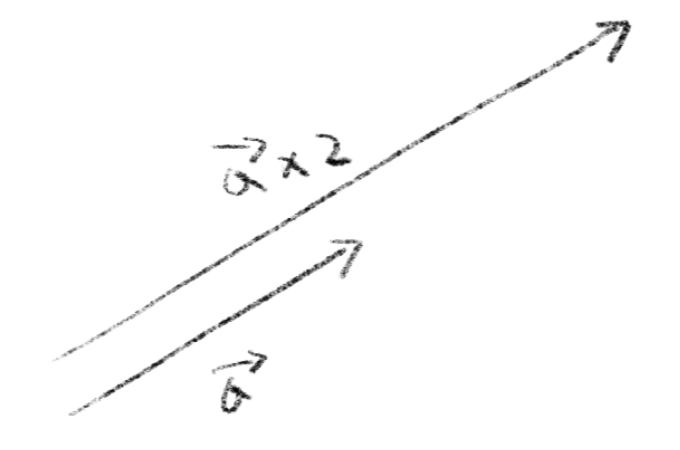
A vectors can be also multiplied by a scalar. A scalar is a quantity that has no direction, which is just a number. You can double or halve the length of a vector, or multiply by any number. The calculation is simply to multiply all components by the same number.
ベクトルはスカラー倍にすることもできます。スカラーというのは向きを持たない量のことで、つまりただの数です。ベクトルの長さを2倍にしたり半分にしたり、好きな数を掛けることができます。計算としては全ての成分に同じ数を掛けるだけです。
Normalization
正規化
To normalize a vector means to set the magnitude of a vector to one while maintaining the direction of the vector. This operation is often used when you want to use only the direction of a vector and ignore its magnitude, for example, when you want to calculate the reflection of light on the surface of an object.
ベクトルの正規化とは、ベクトルの方向は維持したまま大きさを1にすることです。例えば物体の表面にあたる光の反射を計算したい場合など、ベクトルの向きだけを用いて、大きさを無視したい時によくこの操作を行います。
To normalize a vector, find its magnitude(see above) and divide the original vector by that value. A vectors with magnitude of exactly one is called a unit vector, and is denoted as .
ベクトルを正規化するには大きさを求めてその値で元のベクトルを割ります。大きさがちょうど1のベクトルを単位ベクトルと呼び、と表記します。
Dot Product
ドット積
The dot product, or scalar product, is a very useful operation when studying computer graphics, physics, etc. There are two definitions below, but they are the same thing and one can be derived the from the other.
ドット積(スカラー積)は、コンピュータグラフィックスや物理を扱っていると必ず出くわす非常に便利な演算です。下に2種類の定義を並べますが、この2つは同じことで、一方からもう片方を導くことができます。
Algebraic definition
代数的定義
The dot product of two vectors and is defined as:
2つのベクトル、 と のドット積は下記のように定義されます。
In 2D
二次元の場合
In words, to calculate the dot product, you can multiply the corresponding components of the two vectors and add them all together.
つまりドット積を計算するには、2つのベクトルの同じ成分どうしを掛け合わせて、それを全て足し合わせます。
Geometric definition
幾何学的定義
The dot product is the product of the magnitudes of two vectors multiplied by the cosine of the angle between them.
内積は2つのベクトルの大きさの積にその間の角度のコサインを掛けたものです。
Applications of dot products
内積の応用例
In Math, definitions of many abstract concepts don’t have a single intuitive interpretation, and are often better understood by looking at examples of their use.
数学の抽象的な定義の多くには一意で直感的な解釈がなく、それらの用法を見た方が分かりやすいことがよくあります。
If we connect the two definitions above, we get this. To keep it simple, let’s use the 2D formula, not the generic form.
上の2つの定義をつなげるとこうなります。話を簡単にするため、一般的な式ではなく、二次元の式を使いましょう。
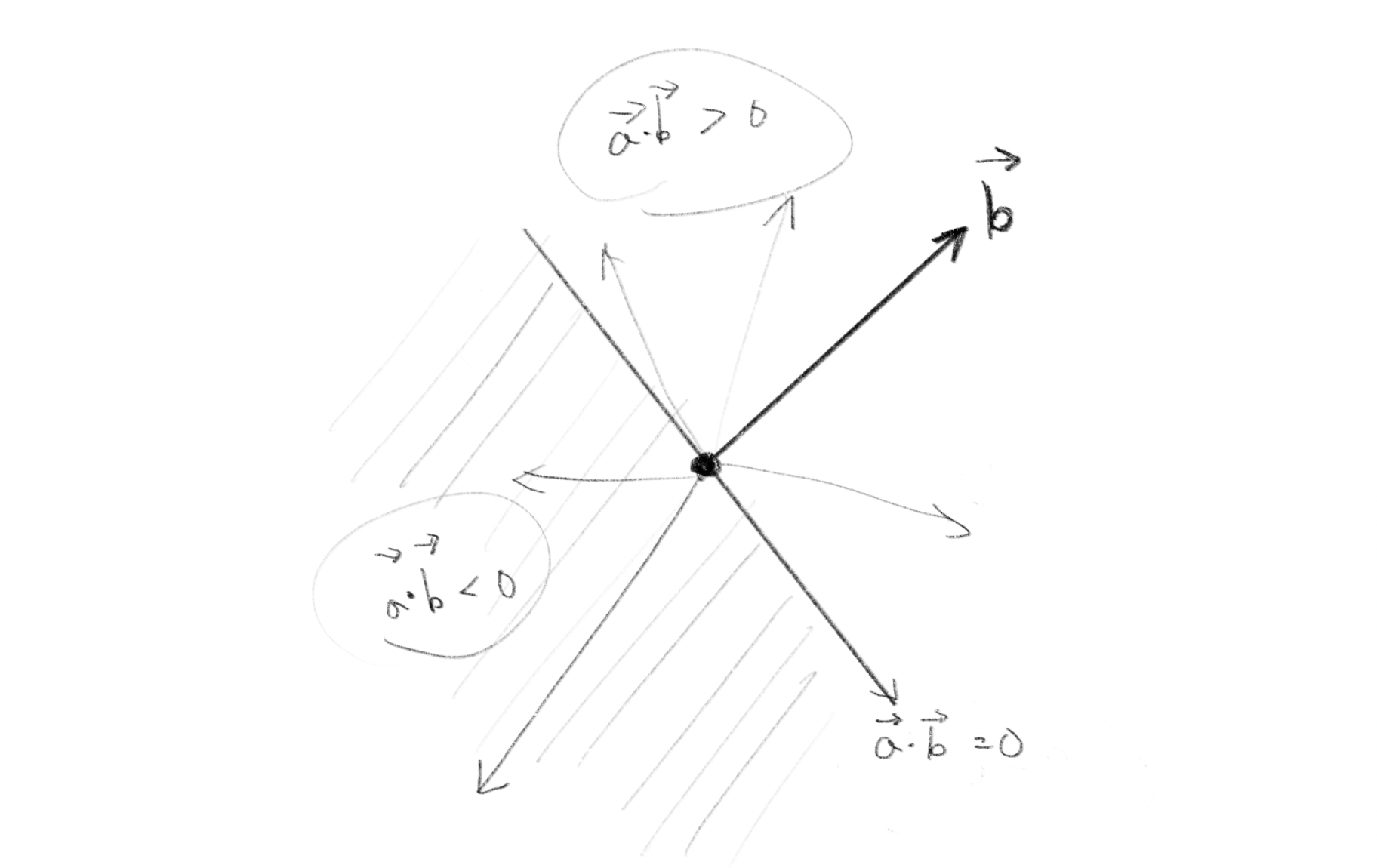
This can be read as a relationship between the components of the vectors and the angles between them. Since the magnitude of the vector is always positive, the sign of the dot product is equal to . Using this formula, a simple multiplication and addition (on the left-hand side) can be used to examine the relationship between the directions of two vectors (right-hand side).
- Two non-zero vectors and are orthogonal if and only if
- If the dot product is positive, the angle between the vectors is less than 90°.
- If the dot product is negative, the angle between the vectors is more than 90°.
- If two vectors are normalized, the dot product is equal to
これはベクトルの成分とその間の角度の関係として読むことができます。ベクトルの大きさは必ず正の値なので、内積の正負はと一致します。この式を使うと簡単な掛け算と足し算(左辺)で2つのベクトルの向きの関係(右辺)を調べることができます。
- 2つの非零ベクトル と は、 のときだけ直交する。
- 内積が正のとき、ベクトル間の角度は90°未満である。
- 内積が負のとき、ベクトル間の角度は90°より大きい。
- 2つのベクトルが正規化されている場合は、内積はに一致する。
The dot product can also be thought of as the magnitude of the projection of one vector onto the axis indicated by another vector . In this case, we want to use only to represent the orientation, so we normalize it and set its magnitude to 1.
This can be applied to decomposition of a force, for example, if a is a force, then the dot product of and (normalized) shows the magnitude of the effect of on the orientation of .
内積は、あるベクトルを他のベクトルが示す軸に投影した場合の大きさとして考えることもできます。この場合は向きを表すためだけに使いたいので、正規化して大きさを1にしておきます。
これは力の分解などに応用ができて、例えばを力だとすると、と(正規化した)の内積はがの向きに及ぼす影響の大きさを示しています。
Cross Product
クロス積
While the dot product of two vectors is a scalar, the cross product is an operation that derives another vector from two vectors.
ドット積では2つのベクトルの積がスカラーになりましたが、クロス積は2つのベクトルからもう1つのベクトルを導く演算です。
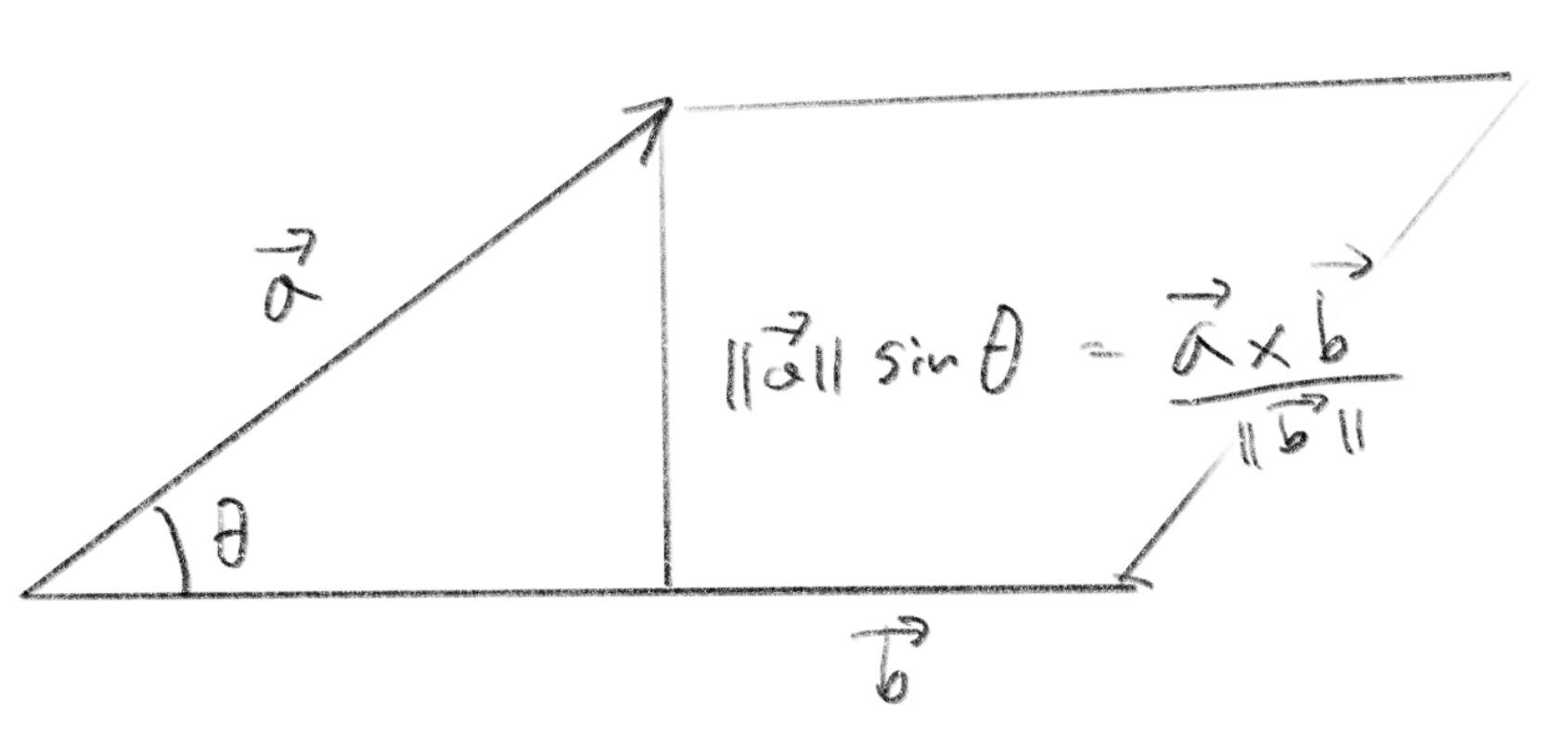
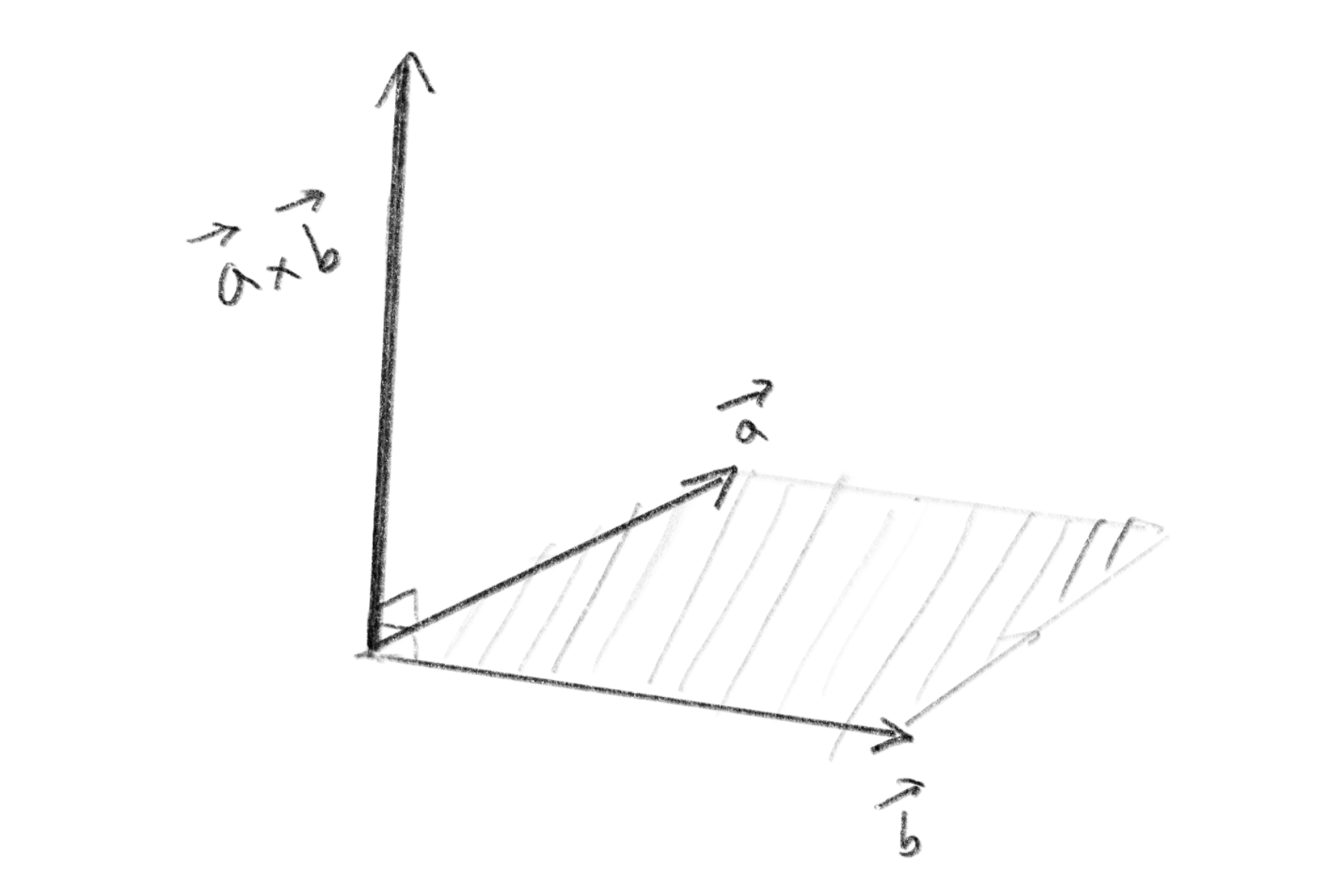
The vector returned by the cross product is the “oriented area of the parallelogram.” It sounds confusing, but what it means is that the vector has a orientation perpendicular to the two original vectors and its magnitude equals the area of the parallelogram that has the original vectors as its sides. It may seem like we are doing two unrelated things at the same time. In fact these two properties are often used in separate situations.
クロス積が返すベクトルは「平行四辺形の向き付き面積 」です。と言われてもよく分かりませんが、つまりこのベクトルは元の2つのベクトルに対して向きが垂直で、大きさが元のベクトルを辺とする平行四辺形の面積に等しくなります。関係のないことを2つ同時にやっている感じがしますが、実際この2つの性質は別々の場面で使われることが多いようです。
Algebraic definition
代数的定義
Geometric definition
幾何学的定義
The cross product is the unit vector perpendicular to the original two vectors () multiplied by the product of the magnitudes and the sine of the angle between them.
クロス積は元の2つのベクトルに垂直な単位ベクトル()に、大きさの積と角度のサインを掛けたものです。
In 3D graphics, cross products are often used to determine the orientation of a plane. If we find the cross product of the orientation of two line segments on a plane, we get a vector called the normal vector, which is a vector perpendicular to that plane. The orientation of the cross product is “right-handed”; if you align the index finger of your right hand and the middle finger to the second, your thumb will point the orientation of the product. Swapping the two vectors results in the same magnitude but opposite orientation.
3Dグラフィクスではクロス積は平面の向きを調べるのによく使われます。ある平面上にある2つの線分の向きに対してクロス積を求めると、その面に対して垂直な法線ベクトルと呼ばれるベクトルが得られます。クロス積のベクトルの向きは「右手系」で、1つ目のベクトルを右手の人差し指、2本目を中指に合わせると親指の向きが積の向きになります。ベクトルの順序を逆にすると大きさは同じで向きが逆になります。
The above explanation applies only to three dimensions, since the vector perpendicular to two vectors is uniquely determined only in three dimensions (it does not exist in two dimensions; in four or more dimensions there are more than one).
上の説明は三次元だけに当てはまります。2つのベクトルに対して垂直なベクトルが一意に決まるのは三次元だけだからです(二次元の場合は存在せず、四次元以上では複数存在します)。
Focusing only on the area of the parallelogram, the two-dimensional version can be written as follows.
平行四辺形の面積だけに注目すると二次元版は下記のように書けます。
Because the (magnitude of) cross product represents the area of a parallelogram that is maximum when the two vectors are perpendicular and zero when they are aligned, it can be used, to inspect the angle between vectors similarly to the dot product.
Also as in the image below, it can also be used to find the distance from a straight line to a point using only multiplication and addition without using trigonometric functions (see Collision detection between a Line and a Circle).
クロス積は2つのベクトルの向きが垂直な時に平行四辺形の面積が最大になり揃っている時に0になるので、ドット積と同様にベクトルの間の角度を調べるのに使えます。
また、下の図のように三角関数を使わずに掛け算と足し算だけで直線からある点までの距離を調べたりするためにも使えます(直線と円の衝突判定を参照)。