Rotation and Trigonometry 回転と三角関数
Trigonometry
三角関数
It had never occurred to me until I started coding graphics, but trigonometry is actually extremely useful and I can’t live without it.
グラフィック系のコーディングを始めるまでは夢にも思いませんでしたが、三角関数は非常に便利で、それなしでは生きていけないほどです。
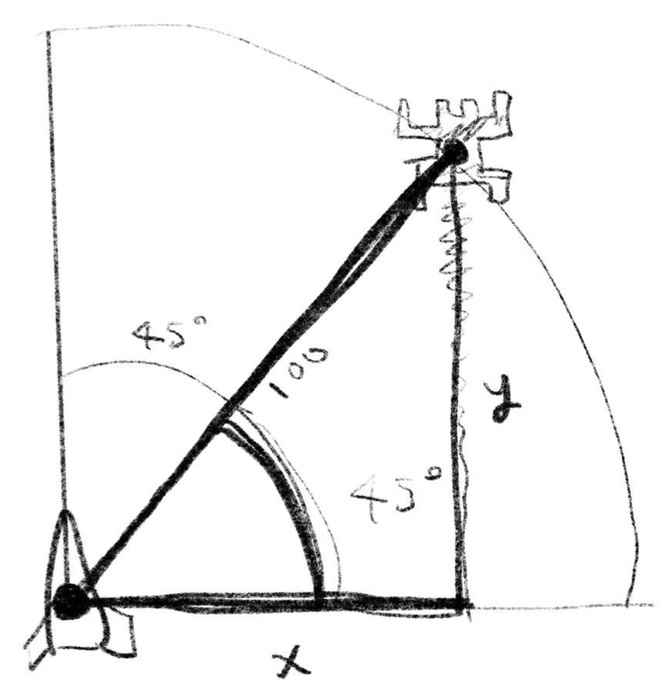
One of the most common uses of trigonometric functions in two-dimensional graphics is when you know the polar coordinates of an object, i.e., its angle and distance, and you want to convert them to x and y-coordinates. For example, if the enemy is at 45 degrees to the right and a distance of 100 from the spaceship, its xy-coordinates would be:
2次元のグラフィクスで最も使うのは対象物の極座標、つまり角度と距離が分かっている場合にそれをx座標とy座標に変換したい場合でしょう。例えば敵が宇宙船から右斜め45度、距離100の位置にいるとするとそのxy座標は下のようになります。
x = cos(45deg) * 100
y = sin(45deg) * 100
Trigonometric functions are easy to understand if you imagine a rotating line (or a ray) going through the center of a circle with a radius of 1. When the line is rotated by an angle θ, it intersects the circle at cos θ = x and sin θ = y. Using right triangles, we can also define the sine function as the ratio of the opposite side to the hypotenuse, and the cosine function as the ratio of the adjacent side to the hypotenuse.
三角関数は半径が1の円の中で線を角度θだけ回転させた時に、cos=x、sin=yと考えるとわかりやすいです。直角三角形を使って、サインは対辺(opposite)と斜辺(Hypotenuse)の比、コサインは隣辺(adjacent)と斜辺の比として定義することもできます。
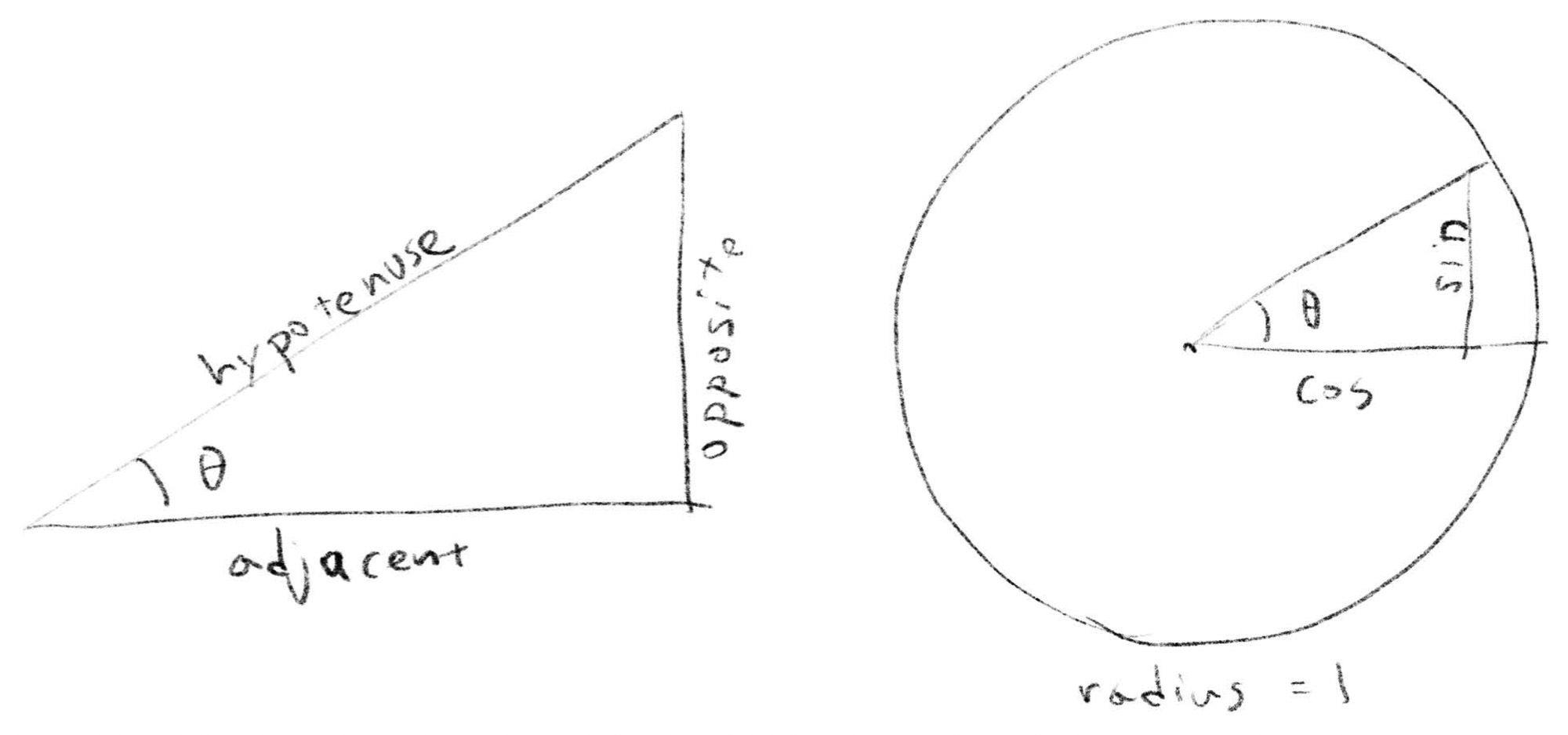
Tangent is the ratio of opposite and adjacent sides.
タンジェント、tanは対辺と隣辺の比です。
JavaScript’s Math object uses radians instead of degrees as the unit of angle. In radians, the length of an arc of a circle with a radius of 1 is used as the angle. A full rotation is 2π (as you studied in junior high, the length of the circumference of a circle is 2πr), and 180 degrees equals π. To convert from degrees to radians, we can use degree / 180 * pi. If we rewrite the example above in JavaScript:
JavascriptのMathオブジェクトは度ではなくラジアンを角度の単位として使います。ラジアンでは半径1の円の弧の長さを角度として用いるので、一周が2π(中学校で習った通り円周の長さは2πrです)、180度 = 1πになります。度からラジアンに変換するには degree / 180 * pi となるので、上の例をJavascriptで書き直すとこうなります。
x = Math.cos(45 / 180 * Math.PI) * 100;
y = Math.sin(45 / 180 * Math.PI) * 100;
2D Rotation
2D回転
Sometimes we know the x and y coordinates and want to rotate them with respect to a single point. For example, suppose there are several stars around a spaceship and we want to rotate the spaceship. How would the coordinates of the stars, as seen from the spaceship, change?
xy座標が分かっている時に、その座標をある一点を基準に回転させたいこともあります。宇宙船の周りに星が幾つもある状態で、宇宙船を旋回させます。宇宙船から見た星の座標はどのように変化するでしょうか。
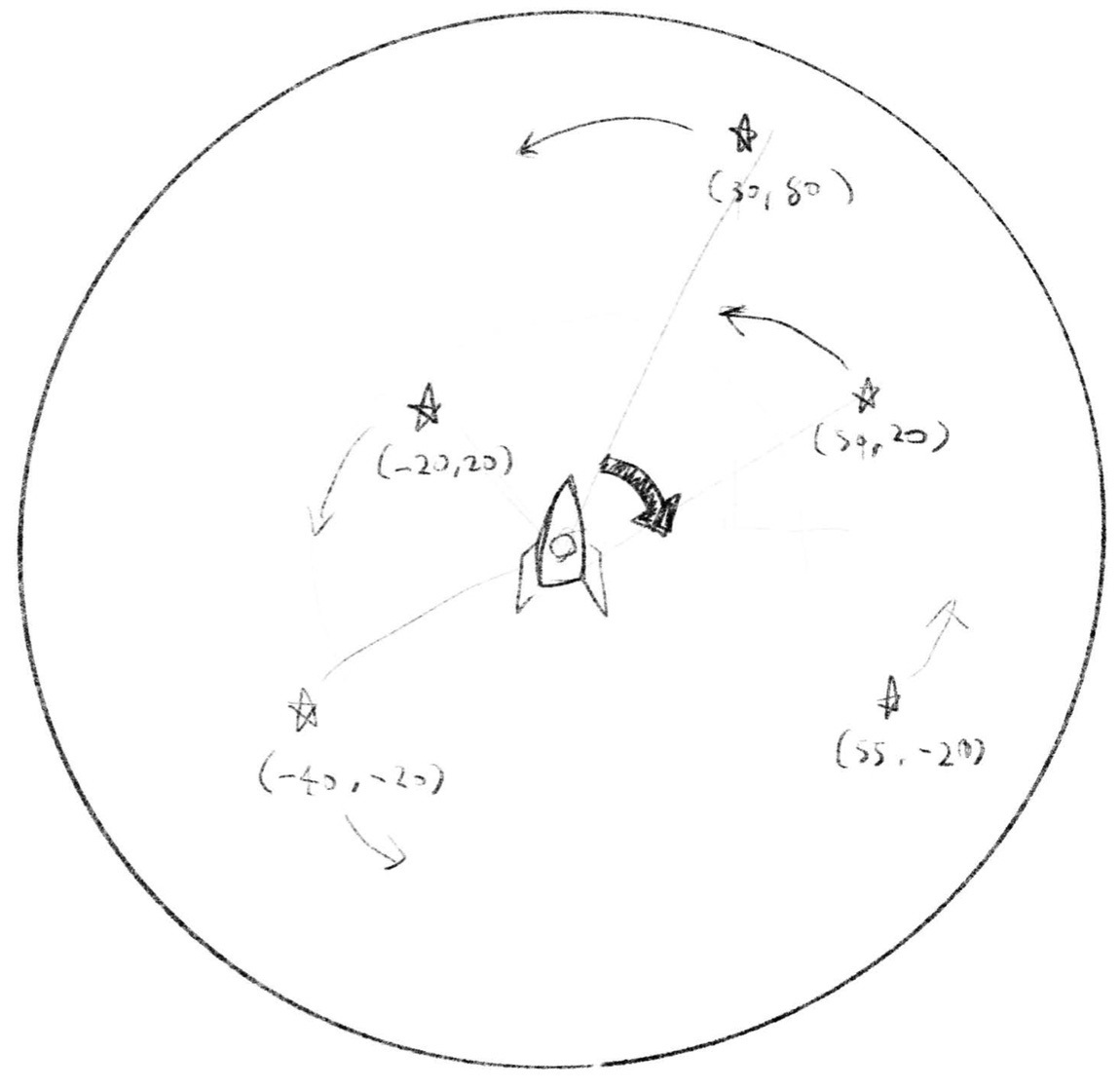
In this case, we can use a rotation matrix.
こういう場合には回転行列が便利です。
If it is difficult to grasp when written as a matrix, a code may be easier to read.
行列で書くとわかりにくい場合はコードの方が読みやすいかも知れません。
newX = cos(theta) * x - sin(theta) * y
newY = sin(theta) * x + cos(theta) * y
The coordinate after rotation can be calculated combining sine and cosine based on the original coordinates. For example, if the coordinates below are [40, 40] and rotated by 30 degrees (1/6π), we get:
元々の座標を元にサインとコサインを使った計算をすると回転後の座標を得ることができます。例えば下の座標が [40, 40] で、30度(1/6π)回転させると下のようになります。
theta = 1/6 * pi
x = 40
y = 40
newX = cos(theta) * x - sin(theta) * y // 14.6410161514...
newY = sin(theta) * x + cos(theta) * y // 54.6410161514...
In the Codepen example below, I used a function like this.
下のCodepenではこんな関数を使っています。
function rotate2d(p, rad) {
  // see p5.Vector.rotate()
  // https://p5js.org/reference/#/p5.Vector/rotate
  let sine = sin(rad);
  let cosine = cos(rad);
  return createVector(p.x * cosine + p.y * sine, -p.x * sine + p.y * cosine);
}
In p5.js, you can use p5.Vector’s rotate() function. Check if your favorite tool has a similar offer. Many tools and libraries provide some support for rotating vectors so that you don’t have to manually write a function.
p5.jsでは、p5.Vectorのrotate()関数を使用することができます。お気に入りのツールに同様の機能があるか確認してみましょう。多くのツールやライブラリは、わざわざ関数を書かなくても済むよう、なんらかの形でベクトルの回転をサポートしています。
For more explanation and proof of this formula, see this page: A Gentle Primer on 2D Rotations
この式の解説と証明はこのページが分かりやすいと思います:A Gentle Primer on 2D Rotations
For more information on coordinate transformations using matrices, see this page: The Book of Shaders - 2D Matrices
行列を使った座標変換についてはこのページも見てみましょう: The Book of Shaders - 2D Matrices
3D Rotation
3D回転
Now that we know how to rotate things in 2D, let’s move on to 3D. In the 2D world, there are only clockwise and counterclockwise rotations, which we can think of as the same thing if we consider negative angles. In the 3D world, there are an infinite number of directions in which we can rotate an object. Because of this, rotation in 3D is a bit more tricky. There are many ways to handle rotation in a 3D world. Let’s take a look at a few of them.
2Dでの回転方法がわかったので、3Dに進みましょう。2Dの世界には時計回りと反時計回りの回転しかありませんし、負の角度を考えればこれらは同じものと考えることもできます。3Dの世界には、物体を回転させる方向が無限に存在するので話が少し複雑になります。3Dの世界で回転を扱う方法は数多くあるのでいくつか見てみましょう。
Euler angles
オイラー角
A natural extension of what we have seen in the 2D world is to break the 3D rotation down into a set of 2D rotations. Take a look at the picture of the airplane below. The airplane is heading in the direction of the y-axis. To change the direction, we can rotate the airplane’s head up or down around the x-axis, or left or right around the z-axis. These are called “pitch” and “yaw” in aviation jargon. To determine the pose of the airplane, we need to consider one more rotation, around the y-axis, or the direction of the airplane. This is called “roll”. This method is called “Euler angles”.
2Dの世界で見たことの自然な拡張は、3D回転を2D回転の集まりに分解することです。下の飛行機の絵を見てください。飛行機はy軸の方向に進んでいます。向きを変えるには、機首をx軸周りに上下に、またはz軸周りに左右に回転できます。これらは航空用語で「ピッチ」と「ヨー」と呼ばれます。飛行機の姿勢を決めるには、さらにもう一つの回転、飛行機の向きまたはy軸周りの回転を考える必要があります。これは「ロール」と呼ばれます。この方法は「オイラー角」と呼ばれます。
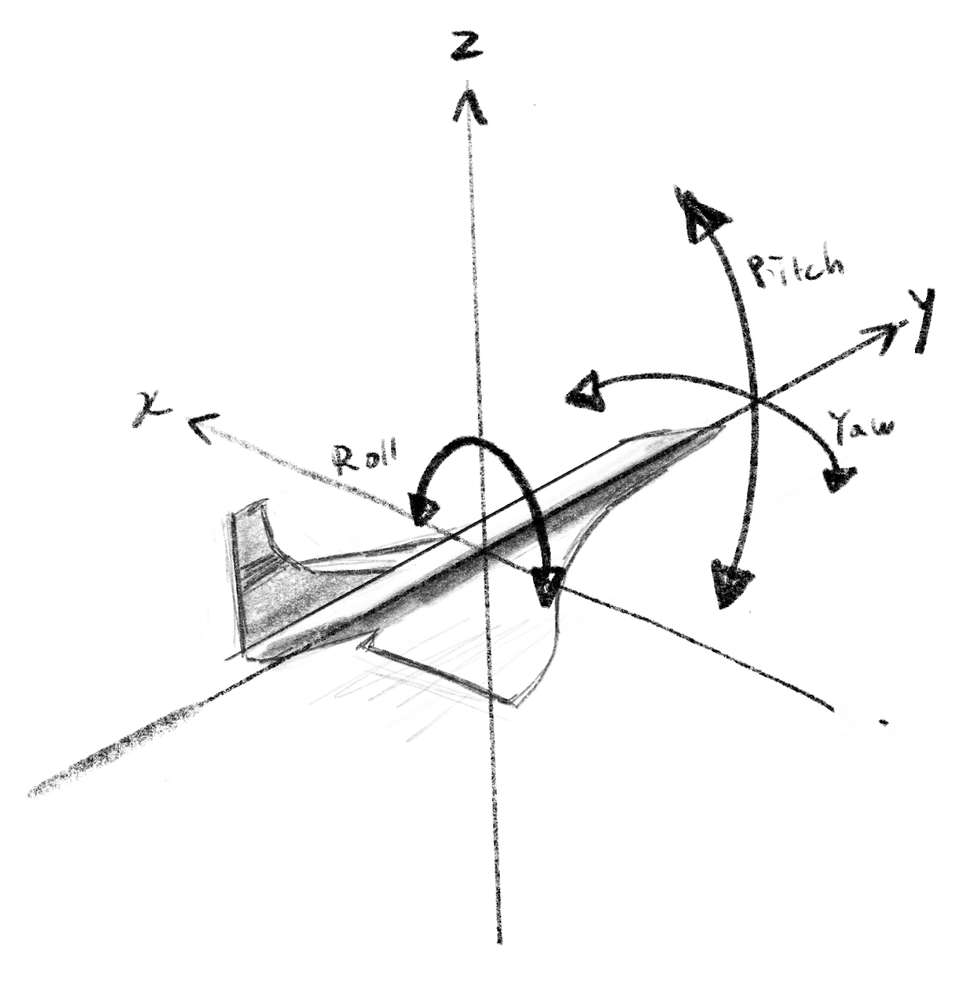
The rotation around each axis can be treated exactly the same as in 2D. For example, if you want to rotate a 3D vector around the x-axis, you can ignore the x value and keep it the same, while applying the 2D rotation matrix to the y and z values. Compare the code below to the 2D function above.
各軸周りの回転は、2Dと全く同じように扱うことができます。たとえば、3Dベクトルをx軸周りに回転させたい場合、x値を無視して同じままにし、2D回転行列をyとzの値に適用します。以下のコードを前述の2D関数と比較してみてください。
function rotate3dAroundXAxis(p, rad) {
let sine = sin(rad);
let cosine = cos(rad);
return createVector(p.x, p.y * cosine - p.z * sine, p.y * sine + p.z * cosine);
}
In the demo below, you can rotate a 3D box around the x-axis by moving the mouse up and down, and around the y-axis by moving left and right.
下のデモでは3Dのボックスを、マウスを上下に動かすことでx軸周りに、左右に動かすことでy軸周りに回転させることができます。
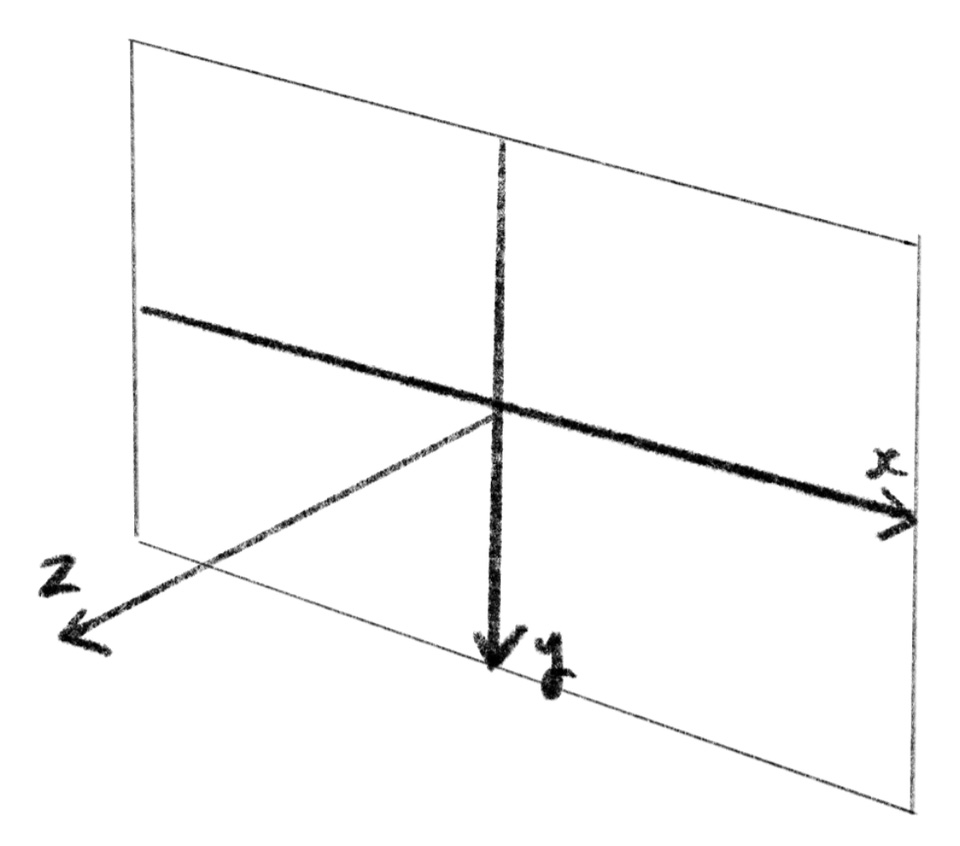
It’s crucial to understand the coordinate system used in each tool. For instance, in the WEBGL mode in p5.js, as demonstrated above, the origin is at the center of the canvas. The x-axis points to the right, the y-axis points downward, and the z-axis points outward from the screen. This coordinate system is different from the airplane drawing above and many 3D tools and game engines, where the xy-plane, like the ground, is horizontal and the z-axis points upward.
ツールで使用されている座標系を把握することは重要です。例えば上のデモでわかるように、p5.jsのWEBGLモードでは、原点はキャンバスの中心にあります。x軸は右、y軸は下、z軸は画面から外への向きを指します。これは、xy平面が地面のように水平、z軸が上向きになる、上の飛行機の絵や多くの3Dツールやゲームエンジンとは異なります。
The order of rotation matters too. The demo above applies rotation around the x-axis, then around the y-axis. Try flipping the order, or add rotation around the z-axis as well, and see what happens. Euler angles also have a well-known problem called “gimbal lock”. To understand this intuitively, you can think of the rotation with Euler angles as similar to a mechanical gyroscope below. Having three rings (gimbals) that can spin around their own axes allows the gyro to rotate in any direction. But when two of these gimbals align, two axes become identical and the gyro loses its freedom.
回転の順序は重要です。上記のデモでは、まずx軸周り、次にy軸周りに回転します。順序を逆にしたり、z軸周りの回転を足したりして、何が起こるか試してみましょう。オイラー角には「ジンバルロック」というよく知られた問題もあります。これを直感的に理解するためには、オイラー角による回転を下の機械式のジャイロのようなものだと考えることができます。3つのリング(ジンバル)がそれぞれの軸周りに回転することで、ジャイロは任意の方向に回転できます。しかし、2つのジンバルの向きが揃うと、2つの軸が重なり、ジャイロは自由度を失います。
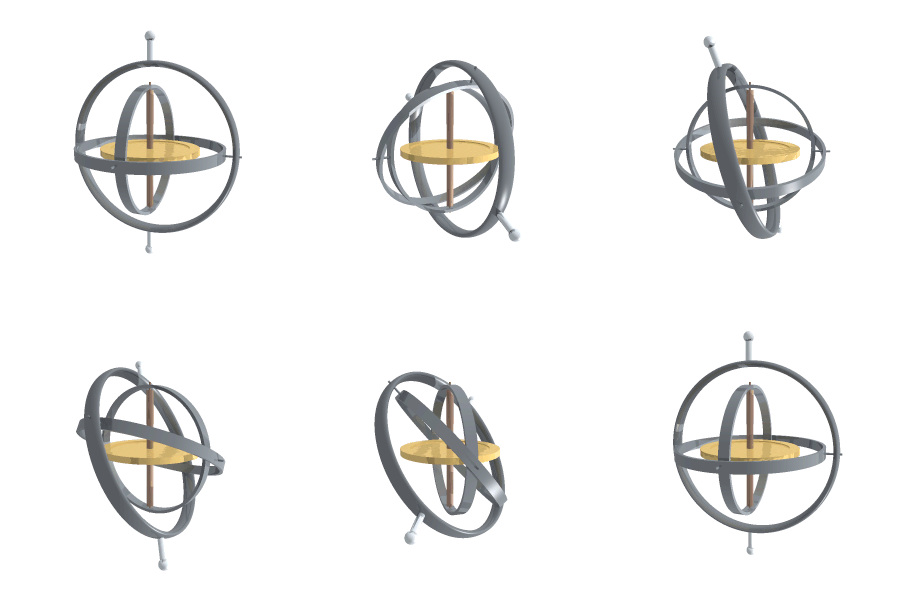

It might be hard to imagine this just in your mind. If that’s the case, I strongly recommend trying to “understand it by hand”. You could model a gyro with cardboard and string, or Lego blocks. Or you could visualize with code or with a 3D tool.
これを頭の中だけで想像するのは難しいかもしれません。その場合は「手を動かして理解する」ことを強くお勧めします。ダンボールと紐や、レゴブロックなどでジャイロの模型を作ってみましょう。または、コードや3Dツールを使って視覚化することもできます。
Rodrigues’ rotation formula
ロドリゲスの回転公式
If you want to rotate an object around an arbitrary axis, not just around the x, y, and z axes, you can use Rodrigues’ rotation formula. To rotate a vector, or a point , around an axis represented by a normalized vector , you can calculate the point after the rotation, , as follows.
x、y、z軸だけでなく任意の軸の周りで物を回転させたい場合、ロドリゲスの回転公式を使うことができます。ベクトルまたは点を、正規化されたベクトルで表される軸の周りで回転させた点は次のように計算できます。
This involves a lot of calculations, which is why we’d define it as a function and forget about it.
沢山の計算が必要なので、これを関数として定義してから忘れてしまいましょう。
See this page for the vector operations such as (dot product) and (cross product).
(ドット積) 、 (クロス積)になどのベクトル演算についてはこのページを参照してください。
function rotateVectorAroundAxis(p, axis, angle) {
	// Normalize the axis vector
	const n = axis.copy().normalize();
	// Calculate the sine and cosine of the rotation angle
	const s = sin(angle);
	const c = cos(angle);
	// Calculate the components of the rotated vector
	const p1 = p5.Vector.mult(p, c); // p * cos(angle)
	const p2 = p5.Vector.cross(n, p).mult(s); // cross(n, p) * sin(angle)
	const p3 = p5.Vector.mult(n, n.dot(p) * (1 - c)); // n * dot(n, p) * (1 - cos(angle))
	// Add all components to get the rotated vector
	return p5.Vector.add(p1, p5.Vector.add(p2, p3));
}
The demo below showcases this function. You can rotate the box around a diagonal axis by moving the mouse left and right.
下はこの関数のデモです。マウスを左右に動かすと、箱を対角線軸周りに回転させることができます。
This is an example of the Rodrigues’ rotation formula in use in GLSL. You can find more examples on the Designing 3D world page.
これはロドリゲスの回転公式をGLSLで使った例です。3Dのデザインのページにはより多くの例があります。
Rotation Matrix
回転行列
3D rotation can be expressed in matrix form as well. If you expand the math hidden within the vector operations (dot and cross products), the Rodrigues’ rotation formula can be written in the following shape. This is also implemented in the p5.js demo with the yellow background above as rotateVectorAroundAxis2.
3Dの回転は行列形式でも表現できます。ベクトル演算(ドット積とクロス積)の中に隠れた数式を展開すると、ロドリゲスの回転公式は次の形で書くことができます。これは上の黄色い背景のp5.jsのデモにrotateVectorAroundAxis2として実装されています。
function rotateVectorAroundAxis2(p, axis, angle) {
  // Normalize the axis vector
  const normalizedAxis = axis.copy().normalize();

  // Calculate the sine and cosine of the rotation angle
  const sine = sin(angle);
  const cosine = cos(angle);
  const oneMinusCosine = 1 - cosine;

  // Calculate the components of the rotation matrix
  const ux = normalizedAxis.x, uy = normalizedAxis.y, uz = normalizedAxis.z;
  const matrix = [
    [cosine + ux * ux * oneMinusCosine, ux * uy * oneMinusCosine - uz * sine, ux * uz * oneMinusCosine + uy * sine],
    [uy * ux * oneMinusCosine + uz * sine, cosine + uy * uy * oneMinusCosine, uy * uz * oneMinusCosine - ux * sine],
    [uz * ux * oneMinusCosine - uy * sine, uz * uy * oneMinusCosine + ux * sine, cosine + uz * uz * oneMinusCosine]
  ];

  // Multiply the point by the rotation matrix
  const rotated = createVector(
    p.x * matrix[0][0] + p.y * matrix[0][1] + p.z * matrix[0][2],
    p.x * matrix[1][0] + p.y * matrix[1][1] + p.z * matrix[1][2],
    p.x * matrix[2][0] + p.y * matrix[2][1] + p.z * matrix[2][2]
  );

  return rotated;
}
In fact, various transformations including rotation, translation, shearing, and scaling can be expressed with a matrix. This topic is a little too much to cover here. Let me just link to the Wikipedia page for now (until I have time to write a page myself someday).
実際、回転、平行移動、せん断、拡大縮小など、さまざまな変換が行列で表現できます。ここで取り上げるにはちょっと大変なので(いつか自分でページを書く時間があるまで)、Wikipediaページへのリンクをここに貼っておきます。
Choose a method that fits your purpose. For example, if you’re designing a cannon on the ground, it makes sense to use a vector or an angle representing the horizontal direction and another angle for elevation. In this case, a third axis isn’t necessary. If you’re dealing with a spaceship, a method that doesn’t depend on specific axes, like Rodrigues’ formula or quaternions that we will discuss on the next page, may be more suitable.
目的に合わせて手法を選びましょう。たとえば、地上に置かれた大砲をデザインしているなら、水平方向の向きを表すベクトルか角度と、もう1つ別の角度で仰角を表すのが理にかなっています。この場合、3つ目の軸は必要ありません。宇宙船であれば、ロドリゲスの公式や次のページで扱うクォータニオンのような、特定の軸に依存しない方法が適しているかもしれません。
On the next page, we will take a look at another (pretty complex but fascinating) expression of rotation called quaternion.
次のページでは、クォータニオンと呼ばれる別の(かなり複雑だけど魅力的な)回転の表現について触れます。