Subsurface scattering サブサーフェススキャッタリング
if (uSubsurfaceEnabled) {
    float diffuse = pow(clamp(1.0 + dot(normal, rayDirection), 0.0, 1.0), 2.0);
    diffuse *= ambientOcclusion;
    lighting += color * 0.25 * diffuse * vec3(1.00, 1.00, 1.00);
}
This part roughly simulates subsurface scattering.
この部分では、サブサーフェススキャッタリングの効果を大雑把に再現しています。
Subsurface scattering (SSS) is a phenomenon where light goes into the surface of a translucent material (like skin, wax, or marble), scatters within it, and then comes back at different points. If you hold your hand up to a strong light source, you’ll notice a soft red glow around the edges. The color is different from surface reflections because in the process, skin tissue and blood absorb shorter (blue/green) wavelengths more than longer (red) wavelengths.
サブサーフェススキャッタリング(SSS)は、光が半透明の物質(皮膚、ワックス、大理石など)の表面に入り、その内部で散乱し、異なる点から出てくる現象です。強い光源に手をかざすと、縁の周りに柔らかな赤い光が見えることに気づくでしょう。この色が表面反射とは異なるのは、過程の中で皮膚組織と血液が短い波長(青/緑)を長い波長(赤)よりも多く吸収するためです。
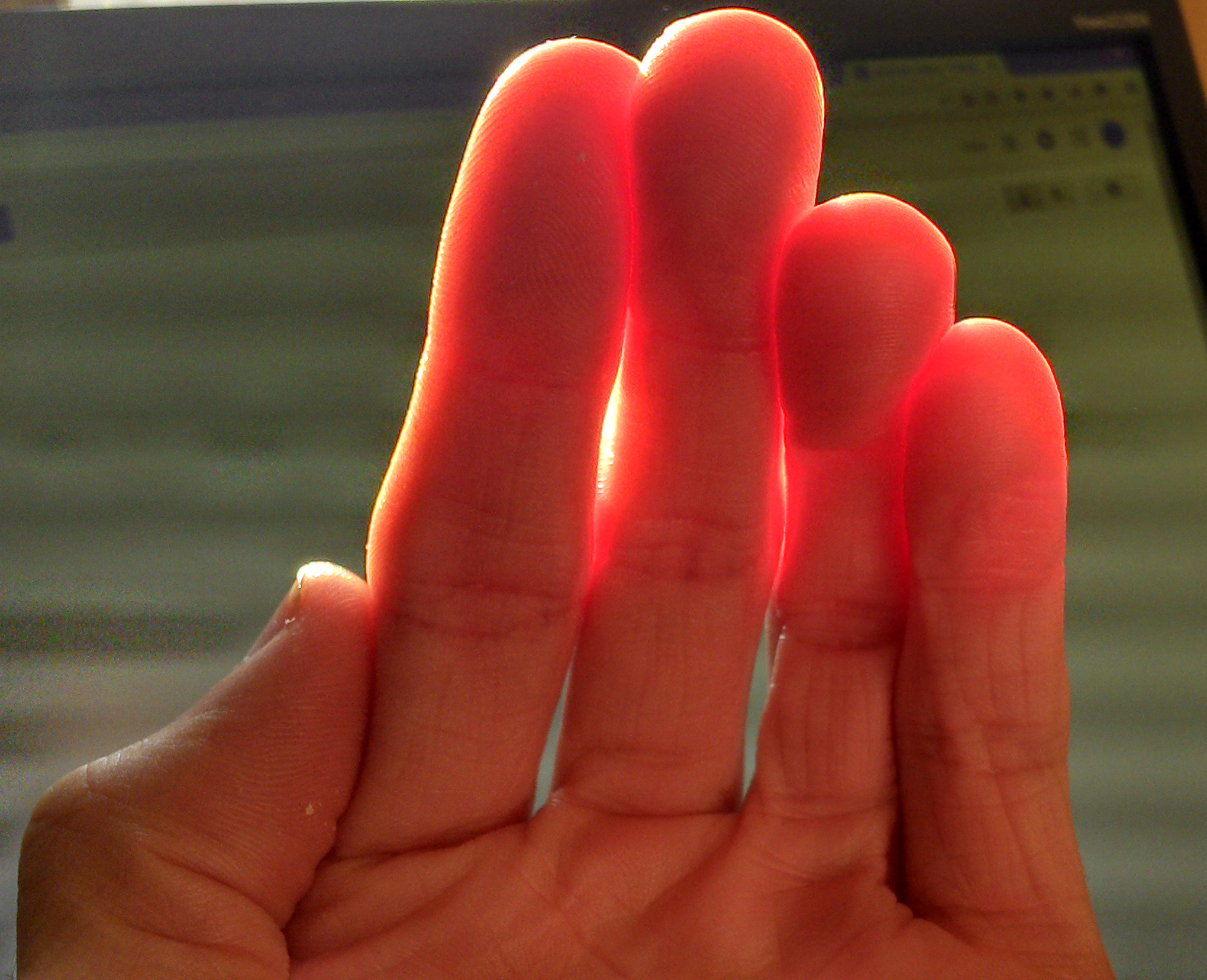
Davepoo2014 CC BY-SA 4.0
https://en.wikipedia.org/wiki/Subsurface_scattering#/media/File:Skin_Subsurface_Scattering.jpg

This code doesn’t precisely replicate the SSS process, but it approximates the soft glow that SSS creates around an object’s contours. dot(normal, rayDirection) is -1 when they are in opposite directions, and 0 when they are perpendicular. This makes the diffuse larger in the area around the edges. Then the ambient occlusion is applied to account for occlusion by surrounding surfaces.
このコードはSSSのプロセスを正確に再現するものではありませんが、物体の輪郭周辺にSSSが生み出す柔らかな光を模倣することで、その効果を再現しています。dot(normal, rayDirection)は、両者が反対方向を向いているときに-1、垂直のときに0となり、これによって、エッジ周辺の領域でdiffuseが大きくなります。その後、周囲の表面による遮蔽を考慮するためにアンビエントオクルージョンが適用されます。
The last line adjusts the color and adds it to the lighting. vec3(1.00, 1.00, 1.00) doesn’t do anything, but if you change this value, you can emulate the effect of different absorption inside the material, like the human skin example.
最後の行は色を調整し、lightingに追加します。vec3(1.00, 1.00, 1.00) は何もしていませんが、この値を変更すると、人間の肌の例のように、マテリアルの内部での異なる波長の光が吸収される効果を再現することができます。
This effect is subtle but adds soft lighting without making the scene too bright or washed out. In the demo, try turning the subsurface scattering on and off. Then turn everything other than the subsurface scattering off to see the effect in isolation.
この効果は微細ですが、全体を明るくぼやけさせることなく、柔らかな照明を加えています。デモ上で、 Subsurface scatteringのオン/オフを切り替えてみましょう。その後、Subsurface scattering 以外のすべてをオフにして、効果を単独で確認してください。