Sunlight 太陽光
// Sunlight contribution.
if (uSunlightEnabled) {
    vec3 lightDirection = normalize(vec3(-0.5, 0.4, -0.6));
    vec3 halfVector = normalize(lightDirection - rayDirection);
    float diffuse = clamp(dot(normal, lightDirection), 0.0, 1.0);
    diffuse *= uShadowEnabled ? calcSoftshadow(intersectionPoint, lightDirection, 0.02, 2.5) : 1.0;
    float specular = pow(clamp(dot(normal, halfVector), 0.0, 1.0), 16.0);
    specular *= diffuse;
    specular *= 0.04 + 0.96 * pow(clamp(1.0 - dot(halfVector, lightDirection), 0.0, 1.0), 5.0);
    lighting += color * 2.20 * diffuse * vec3(1.30, 1.00, 0.70);
    lighting += 5.00 * specular * vec3(1.30, 1.00, 0.70) * specularStrength;
}
This part calculates the contribution of the sunlight. This demo uses a simple diffuse and specular model to approximate the sunlight, which is a parallel light from very far away.
この部分では太陽光が与える影響を計算します。太陽光は非常に遠くからの平行な光です。このデモでは、これを単純な拡散光と鏡面反射モデルを使って近似します。
Specular reflections and diffuse light 鏡面反射と拡散光
In the demo, try turning off everything other than the sunlight, then toggle the shadow on and off to see the effect of the sunlight in isolation.
太陽光の効果を単独で確認するために、デモ上で Sun 以外すべてをオフにして、Shadow のオン/オフを切り替えてみましょう。
Diffuse light
ディフューズ(拡散光)
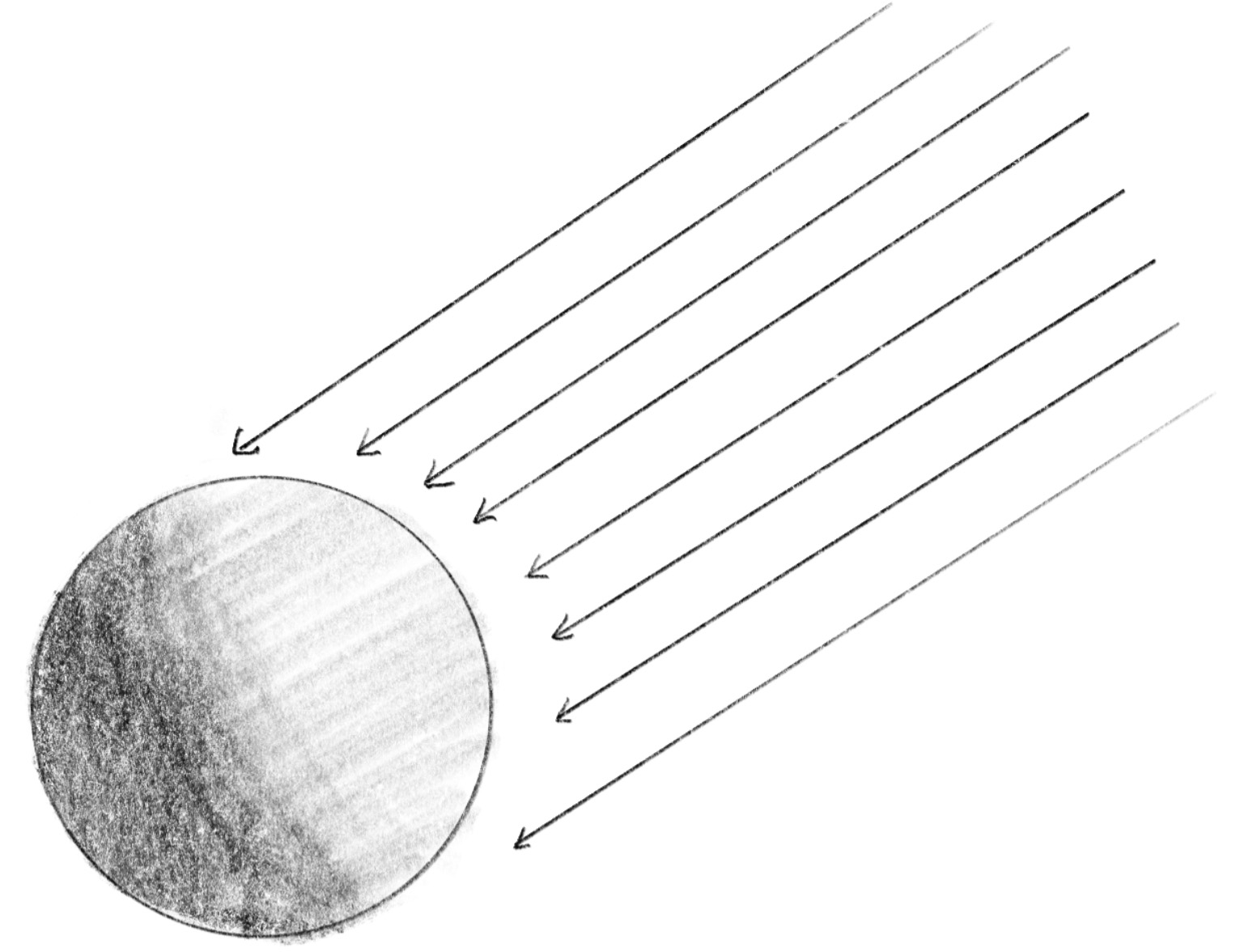
diffuse represents the light scattered on the surface of the object in all directions. This is calculated as the dot product of the direction of the light and the normal (the direction of the surface). The more aligned they are, the more light the surface receives and scatters.
diffuseは、物体の表面であらゆる方向に散乱する光を表現します。これは、光の方向と法線(表面の方向)のドット積として計算されます。これらの方向が一致するほど、表面がより多くの光を受け取り、散乱させます。
float diffuse = clamp(dot(normal, lightDirection), 0.0, 1.0);
Specular reflection
スペキュラー(鏡面反射)
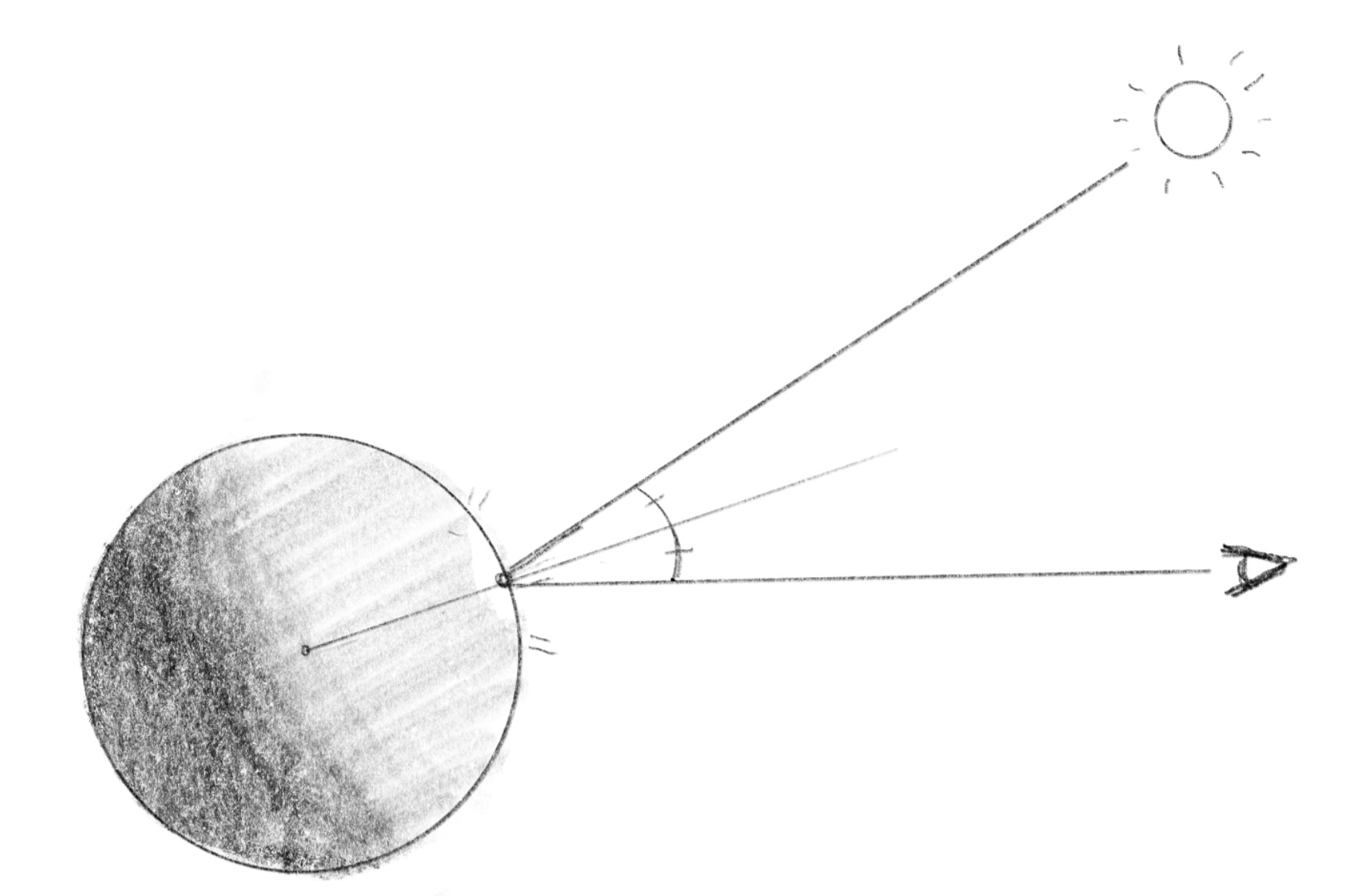
specular emulates the direct reflection of the light source, in this case the sun, that creates bright highlights. This is calculated by using the half vector, the direction halfway between the ray from the viewpoint and the light direction. The closer this half vector aligns with the surface normal, the brighter the highlight. The second parameter, 16.0, in the following line controls the sharpness of the highlight—try adjusting this value to see its effect.
specularは、光源(この場合は太陽)からの直接反射を模して、明るいハイライトを生成します。これは、視点からのレイと光源の方向の中間に当たるハーフベクトルを使って計算します。ハーフベクトルがオブジェクトの法線により一致するほど、ハイライトは明るくなります。下の行の2番目のパラメータ16.0は、ハイライトのシャープさを制御します。この値を変えて、効果を確認してみましょう。
float specular = pow(clamp(dot(normal, halfVector), 0.0, 1.0), 16.0);
Then specular is multiplied by diffuse to limit it to the area where the direct sunlight is.
スペキュラーを直射光が当たる領域に限定するために、ディフューズを掛け合わせます。
specular *= diffuse;
The next part emulates the Fresnel effect.
次の部分ではフレネル効果を再現します。
specular *= 0.04 + 0.96 * pow(clamp(1.0 + dot(normal, rayDirection), 0.0, 1.0), 5.0);
This effect increases reflectivity based on the angle between the viewpoint’s direction (rayDirection) and the normal. Here, 0.04 is the base reflectivity when the view direction and normal are aligned. As the angle between them increases (toward the edges of the object seen from the viewpoint), reflectivity increases and the reflection appears stronger. Notice that dot(normal, rayDirection) is -1 when they are in opposite directions, and 0 when they are perpendicular.
この効果は、視点の方向(rayDirection)と法線の間の角度に基づいて反射率を増加させます。0.04 は視点と法線の向きが一致している時の基本反射率です。両者の角度が増すにつれて(視点から見たオブジェクトの端に向かって)、反射率が増加し、反射がより強く見えます。dot(normal, rayDirection) は、両者が反対方向を向いているときに-1となり、垂直のときに0となることに注意してください。
Color Tinting
色をつける
Both diffuse and specular components are added to the lighting variable, with a slight yellow tint applied by multiplying each with vec3(1.30, 1.00, 0.70) to give a warm color. Or you could think of it as counterbalancing the blue color of the sky reflection to make the sun appear white.
diffuse と specular の両コンポーネントをlighting 変数に加算しますが、それぞれに vec3(1.30, 1.00, 0.70) を掛けることで、わずかに黄色みがかった暖かい色調を適用します。これは、空の反射による青色を相殺して太陽が白く見えるようにしていると考えることもできます。
Soft Shadow
ソフトシャドウ
Lastly, note that diffuse is multiplied by the result of the calcSoftshadow() function. This function casts a new ray from the intersectionPoint in the direction of the light to see if the ray intersects with an object. If it does, that means the point is in the shadow of the object.
最後に、diffuse と calcSoftshadow() 関数の結果を掛け合わせていることに注目してください。この関数は、intersectionPointから光源の方向に新しいレイを投射し、そのレイが物体と交差するかどうかを確認します。交差する場合、その点はその物体の影の中にあることを意味します。