Deformation and Feedback 変形とフィードバック
Deformation is the process of transforming an image by changing its shape or perspective. It is often used for image correction, such as fixing distortions caused by camera lenses, or to create special effects in images. Additionally, we will explore the feedback technique, which involves iteratively applying image processing to create more complex and interesting effects.
変形とは画像の形状や視点を変えることによって画像を変換するプロセスで、カメラレンズによって引き起こされる歪みを直すといった画像補正や、画像に特殊効果を加えるためによく使用されます。このページでは、画像処理を反復的に適用してより複雑で面白い効果を作り出すフィードバックも扱います。
Many examples on this page use GLSL shaders. To learn more about shaders, please read The Book of Shaders. The page on 2D Matrices will be particularly useful.
このページでは多くのサンプルでGLSLシェーダを使用しています。シェーダについて詳しく知りたい場合は、The Book of Shadersを読んでください。特に二次元行列のページが役立つと思います。
Deformation
変形
| 0 | 0 | 0 |
| 0 | 0 | 1 |
| 0 | 0 | 0 |
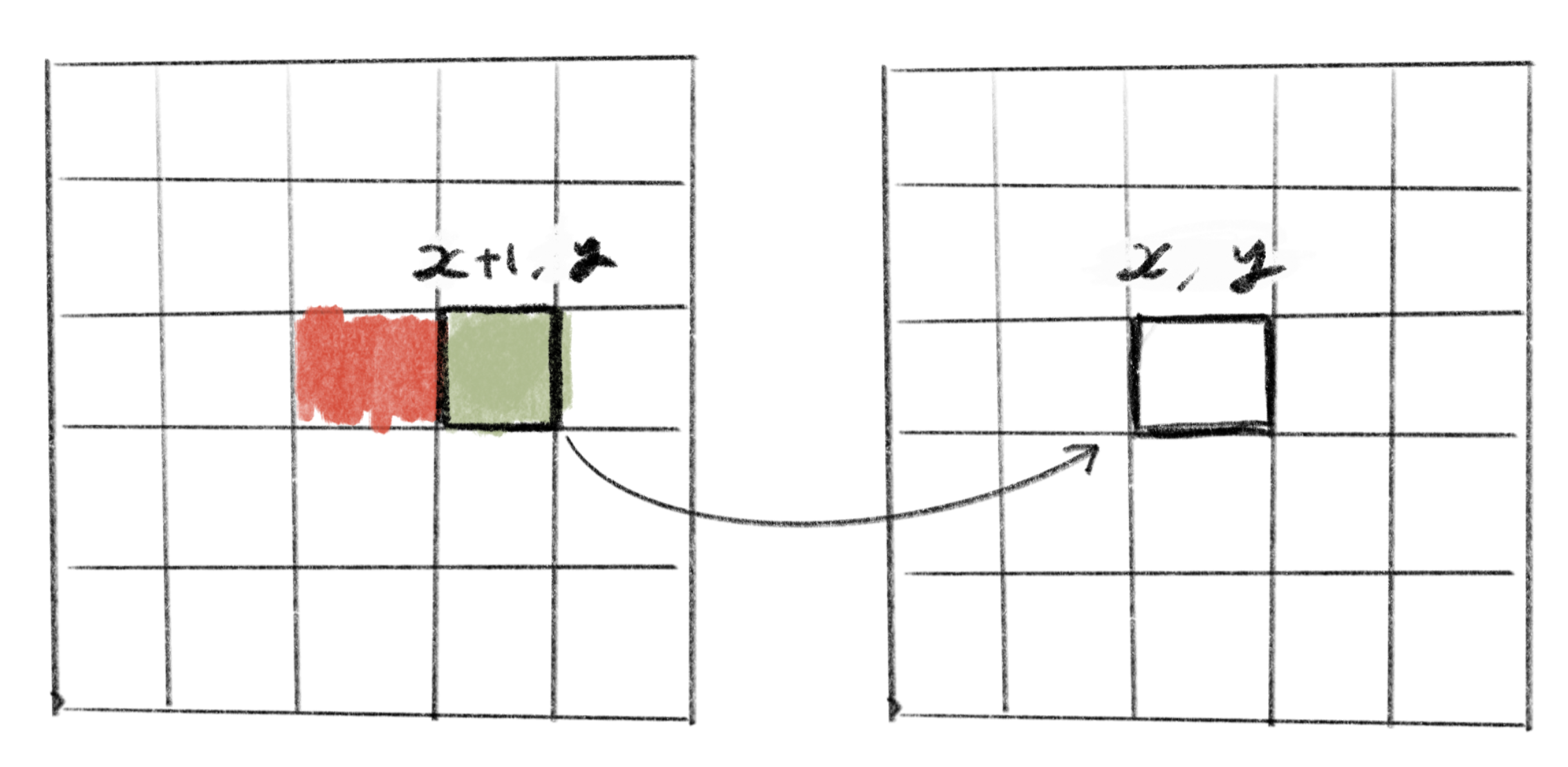
We saw this example above at the end of the Convolution page. As you can see in the demo, this filter shifts the entire picture one pixel to the left. Because the cells in the filter with a value of zero have no effect, this simply copies the color of the pixel to the right of the current position. In other words, this filter copies the color of from the original image to the coordinate .
畳み込みのページの最後で上の例を見ました。デモでわかるように、このフィルターは画像全体を1ピクセル左にずらします。値がゼロの部分は何もしないので、このフィルタは単に現在の位置から右にあるピクセルの色をコピーする働きをします。言い換えるとこのフィルターは座標に元の画像のの色をコピーします。
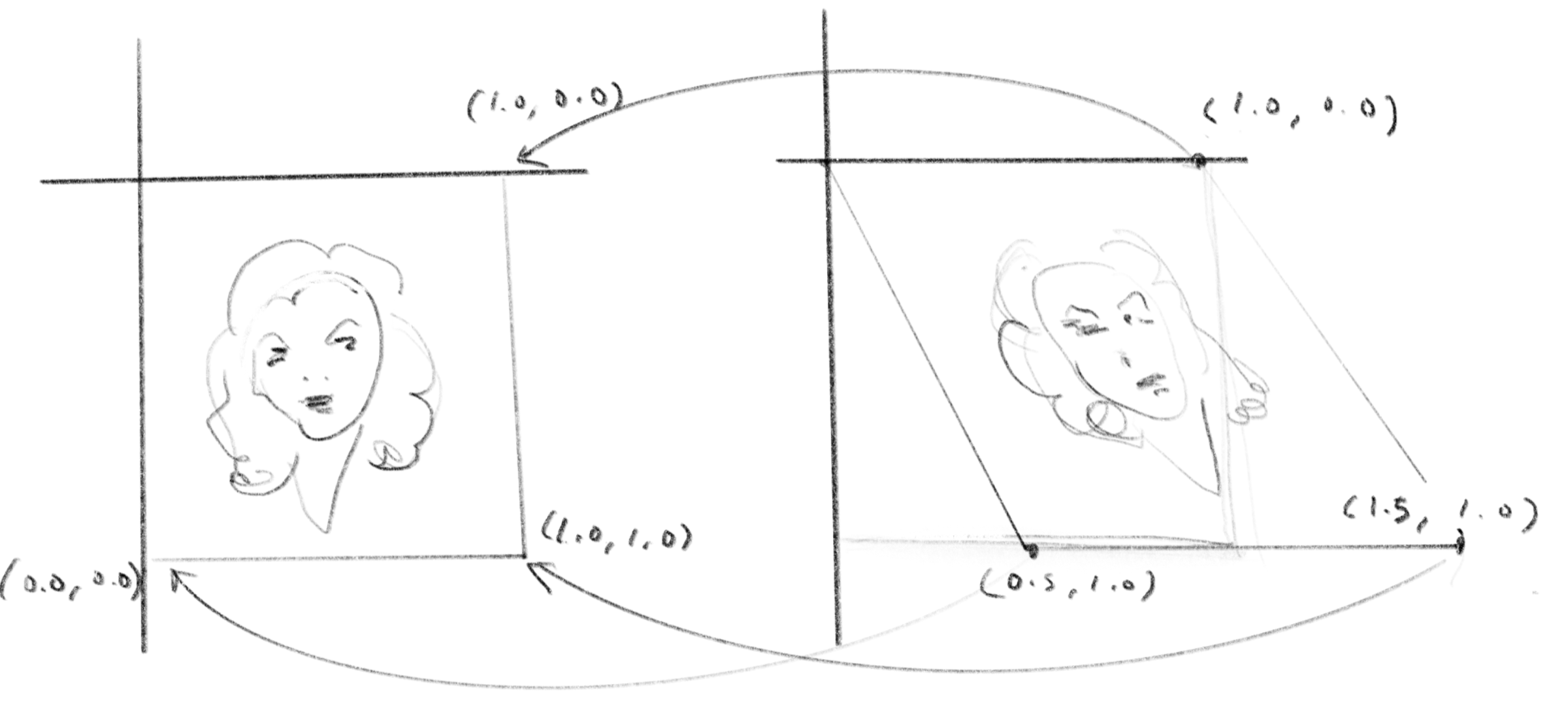
Let’s take a look at the following equation. is the destination coordinates and is the source coordinates. Instead of using pixels as the unit, we map the top-left corner to and the bottom-right corner to .
次の式を見てみましょう。 はコピー先、はコピー元の座標です。ピクセル単位ではなく左上を、右下をとします。
This equation causes the image to slant, as shown in the demo below.
この式を用いると下のデモのように画像が斜めに傾きます。
Affine transformation
アフィン変換
Let’s generalize this and consider the following equations below.
これを一般化して下のような式を考えてみます。
This is called an affine transformation, and is often expressed with matrices as shown below:.
これはアフィン変換と呼ばれ、行列で下のように書かれます。
The third row may seem unnecessary, but it enables the translation of coordinates and the calculation of an inverse matrix to undo the transformation.
3行目は不要に見えるかもしれませんが、座標の並行移動と、変形を元に戻すための逆行列の計算に必要になります。
The demo below sets random values to each of , , , , , . You can see the image gets translated, scaled, skewed and rotated. To scale an image horizontally and vertically, set all values except and to zero. To translate the image, use and . To skew the image, set either or to a non-zero value. If both and are set to non-zero values, the image will rotate (Compare this to the 2D rotation matrix on the Rotation and Trigonometry page). Try experimenting with various values in the demo code.
下のデモでは、、、、、、 のそれぞれにランダムな値が設定されます。画像が並行移動したり、縦横に拡大、縮小したり、斜めに歪んだり、回転したりする様子が見られます。 と 以外のすべての値をゼロに設定すると、画像は縦横に拡大されます。 と を使うと、画像が並行移動します。また、 の のどちらか一方をゼロ以外の値に設定すると、画像が斜めに歪み(スキューまたはせん断と呼ばれます)、 と の両方をゼロ以外にすると、画像が回転します (この式を回転と三角関数のページの、2D回転行列と比較してみましょう)。デモのコードを使ってさまざまな値を試してみましょう。
Affine transformation enables flexible image transformations. However, while it is possible to transform a rectangle into a parallelogram using affine transformation, it cannot create trapezoids, and thus cannot express perspective. A transformation that can convert a rectangle into a trapezoid is called homography (projective transformation).
アフィン変換を使うとかなり自由に画像を変形することができます。ただしアフィン変換では長方形を平行四辺形に変換することはできますが、台形にする、例えば遠近法のような表現はできません。長方形を台形に変換できる変形はホモロジー(射影変換)と呼ばれます。
More freeform transformations
より自由な変形
Deformation of an image is not limited to linear equations, but can be done more freely. Let’s take a look at examples that use the sine function and noise functions.
画像の変形は線形の式を用いるだけでなくもっと自由に行うこともできます。サイン関数を使った例とノイズ関数を使った例を見てみましょう。
Feedback
フィードバック
A feedback effect, or feedback loop, is a process in which the output feeds back into the input, creating an infinite loop. Feedback is not specific to image processing, but rather it can apply to a broad range of systems. For instance, the “howling” of a microphone is a feedback process where the microphone sends the sound signal to a speaker, and the same microphone captures the sound from the speaker again. You must have heard this loop making a very loud noise.
フィードバック効果、またはフィードバックループとは、出力が入力に戻っていくことで無限ループを描くようなプロセスです。フィードバックは画像処理に特化したものではなく、幅広いシステムに適用できます。例えば、マイクの「ハウリング」は、マイクが音声信号をスピーカーに送信し、同じマイクが再度スピーカーから音声をキャプチャするフィードバックの一種です。このループが出す大きな雑音を聞いたことがあるでしょう。
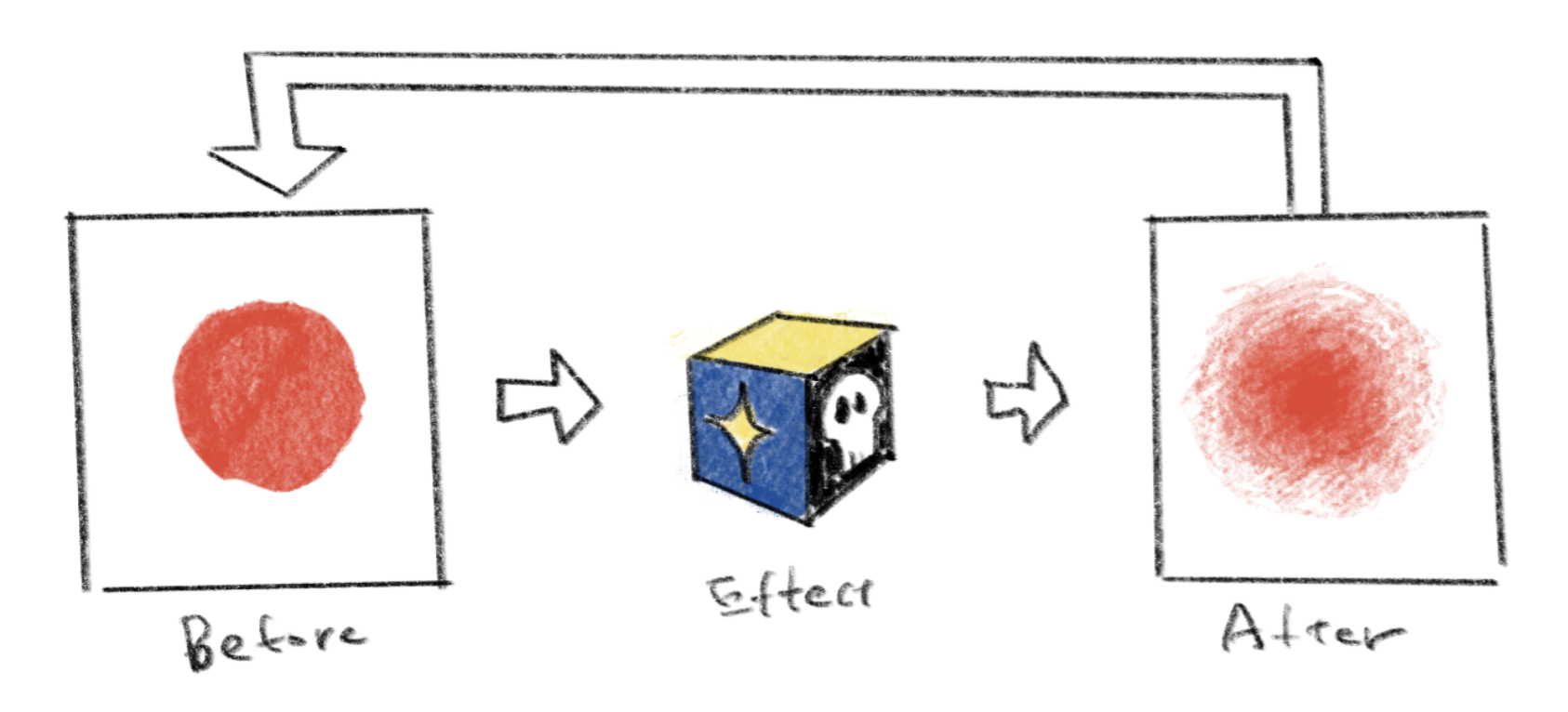
In the context of image processing, feedback refers to the recursive application of an effect to its output. The following demo uses the basically same effect as the sine function example above, with a slight modification to reduce the amount of translation per step. The only big difference is that instead of using the original image as input, it captures the result of the effect and uses the deformed image as input for the next frame.
画像処理の分野では、フィードバックはある種の画像処理をその出力に再帰的に適用することを指します。下のデモでは、上のサイン関数の例と基本的に同じエフェクトを使用しています(ステップごとの移動量を減らすように少しだけ変更を加えています)。唯一の大きな違いは、元の画像を入力として使用する代わりに、エフェクトの結果をキャプチャして変形した画像を次のフレームの入力として使用していることです。
The demo below is a feedback with a noise function. It looks like flowing liquid or paint blending colors.
以下のデモはノイズ関数を用いたフィードバックです。流れる液体や塗料が混ざり合う様子にも見えます。
The following demo repeatedly applies a Gaussian blur to the image.
以下のデモでは、画像に繰り返しガウシアンブラーを適用しています。
As the examples above suggest, the concept of feedback can extend beyond image processing. Feedback can also be used for simulation models, where the state of the system at a given time determines its next state. A good example of this is the reaction-diffusion system, which can simulate the reactions of chemical substances. This topic is beyond the scope of this page, but many examples can be found on Shadertoy and other similar websites. The video below is made with a combination of a reaction-diffusion-like feedback process and the wave equation.
上記の例からも見て取れるように、フィードバックの概念は、画像処理を超えて拡張することができます。 フィードバックは、ある時点でのシステムの状態が次の状態を決定するシミュレーションモデルにも使用できます。化学物質の反応をシミュレートできる反応拡散( Reaction-Diffusion)システムはこの良い例です。このトピックは本ページの範囲を超えていますが、ShadertoyなどのWebサイトで多くの例を見ることができます。下のビデオも、反応拡散のようなフィードバックプロセスと波動方程式の組み合わせで作成されています。