Controlling curves 曲線のコントロール
We have explored different ways of defining and drawing curves, but we haven’t discussed the quality of curves much. Curves can have various visual characteristics. For example, some curves might look more organic and natural, while others might appear more geometric and mechanical. How can we create these different looks of curves?
ここまで曲線を定義し描画する様々な方法を見てきましたが、曲線の質についてはあまり議論してきませんでした。曲線には多様な見た目の特徴があります。例えば曲線には有機的で自然に見えるものも、より幾何学的で機械的に見えるものもあります。これらの異なる曲線の見た目はどうしたら作れるのでしょうか。
Cubic class
Cubic クラス
For most of the examples on this page, we will use the same Cubic class that represents a Cubic Bézier curve we discussed previously as a way to define curves as a baseline. For sketching purposes, where precision is not too important, you can combine multiple cubic Bézier curves to approximate any curve.
このページのほとんどの例では、すでに触れた、3次ベジェ曲線を表す Cubic クラスを曲線を定義する方法の基礎として使います。スケッチ目的で精度がそれほど重要でない場面では、複数の3次ベジェ曲線を組み合わせれば任意の曲線を近似できます。
class Cubic {
  constructor(a0, c0, c1, a1) {
      this.a0 = a0.copy();
      this.c0 = c0.copy();
      this.c1 = c1.copy();
      this.a1 = a1.copy();
  }

  getPointAt(t) {
      const u = 1 - t;
      return new p5.Vector(
          this.a0.x * (u * u * u) + this.c0.x * (3 * t * u * u) +
          this.c1.x * (3 * t * t * u) + this.a1.x * (t * t * t),
          this.a0.y * (u * u * u) + this.c0.y * (3 * t * u * u) +
          this.c1.y * (3 * t * t * u) + this.a1.y * (t * t * t)
      );
  }

  draw() {
    const resolution = 128;
    strokeCap(ROUND);
    beginShape();
    for (let i = 0; i <= resolution; i++) {
      const t = i / resolution;
      const p = this.getPointAt(t);
      vertex(p.x, p.y);
    }
    endShape();
  }
Natural Spline
ナチュラルスプライン
Bézier curves give you detailed control using control points, but creating a complex shape requires many of them, which can be very troublesome to configure. Additionally, combining multiple Bézier curves does not always result in smooth connections. Natural spline is a very handy method when you just want a smooth curve nicely goes through a bunch of points.
ベジェ曲線は制御点を用いて細かな制御ができますが、複雑な形を作るには多くの制御点が必要で、設定がとても面倒です。また、複数のベジエ曲線を組み合わせても、必ずしも滑らかに繋がってくれるわけではありません。ナチュラルスプラインは、たくさんの点を滑らかにうまく通過する曲線が欲しいときに非常に便利な方法です。
Continuity of Curves
曲線の連続性
To understand what the natural spline is, let’s briefly discuss what being smooth means. To measure how smooth a curve is in a mathematical sense, you can take the derivative of the function that represents the curve. The first derivative shows the rate of change of position, and the second derivative shows the rate of change of the rate of change.
ナチュラルスプラインが何なのかを理解するために、「滑らかである」ということの意味について簡単に議論しましょう。曲線の滑らかさを数学的に測るには、その曲線を表す関数の微分を取ることができます。最初の微分は位置の変化率を示し、2度目の微分はその変化率の変化を示します。このようにすると、異なるレベルの連続性を考えることができます。
-
Continuity: The curve itself is continuous. There are no breaks or gaps. You can imagine a line without lifting your pen. There is no gap in this line, but there can be sharp corners and turns that may not appear smooth.
-
Continuity: The first derivative of the curve is continuous. This means the curve has no sharp corners or cusps; it changes direction smoothly. You can think of a smoothly curving road without any sudden turns.
-
Continuity: The second derivative of the curve is continuous. This means that even the rate at which the curve changes direction is continuous. Roller coasters are usually designed to have continuity as much as possible to avoid too sudden a change in acceleration, which can be uncomfortable or even harmful to the passengers. If it is not continuous, sudden changes in G-forces might slam you into the seat or cause whiplash.
-
連続: 曲線に途切れや隙間がなく連続しています。ペンを持ち上げずに描いた線を想像してください。この線には途切れた箇所はありませんが、滑らかに見えない鋭い角や曲がった部分があるかもしれません。
-
連続: 曲線の1次微分が連続です。これは、曲線が滑らかに方向を変え鋭い角や尖った点がないことを意味します。突然の折れ曲りがない滑らかな道路を想像してみましょう。
-
連続: 曲線の2次微分が連続です。これは、曲線が向きを変える速ささえも滑らかであることを意味します。ジェットコースターは、乗客に不快さや危険を与えないよう、できるだけ連続性を持つように設計されています。連続でない場合、急なGの変化で体を席に打ちつけたり、むち打ち症になったりするかもしれません。
A natural spline is a series of curves that pass through all the given points and is continuous.
ナチュラルスプラインは、与えられたすべての点を通過し、 連続であるひと繋がりの曲線です。
The following demo approximates this as an array of Bézier curves. The naturalSpline() function takes an array of the points(p5.Vector) and returns an array of Cubic objects.
次のデモは、これをベジェ曲線の配列として近似します。naturalSpline() 関数は点(p5.Vector)の配列を受け取り、Cubic オブジェクトの配列を返します。
This is based on the implementation of the Natural class in d3.js. You can drag the points to change the shape.
このデモは、d3.js の Natural クラスの実装を基にしました。点をドラッグすると形を変えることができます。
Hobby Curve
Hobby 曲線
While a natural spline is mathematically smooth, it may not always appear to be the smoothest line to the human eye. There are various ways to think about the smoothness of a curve. One approach is to minimize the curvature at any given point, ensuring that each point on the curve looks closer to straight line as possible. The Hobby curve algorithm is designed for this. Using a simple calculation called “mock curvature,” which is an approximation of the more computationally heavy “true curvature,” this method can create a pleasing line that goes through a series of points.
ナチュラルスプラインは数学的に滑らかですが、必ずしも人にとって最も滑らかな線に見えるとは限りません。曲線の滑らかさについて考える方法は色々あります。その1つは、任意の点での曲率を最小限に抑え、曲線上のそれぞれの点ができるだけ直線に近く見えるようにするアプローチで、これがHobby曲線のアルゴリズムが目指す滑らかさです。この方法では、計算が重い真の曲率を求める代わりに、その簡単な近似である疑似曲率を用いて、与えられた点を通る見た目の良い曲線を作れます。
Below is a demo of the Hobby curve. In the same way as the NaturalSpline() , the Hobby() function takes an array of the points and returns an array of Cubic objects.
下が Hobby曲線のデモです。NaturalSpline() と同様に、Hobby() 関数は点の配列を受け取り、Cubic オブジェクトの配列を返します。
The Hobby curve feels softer and more human, somewhat like Henri Matisse’s stroke drawn with a very long brush.
Hobby曲線はより柔らかく人間的で、マティスが使うとても長い筆で描かれたストロークのように見えます。
The demo below is a comparison between the natural spline and the Hobby curve.
以下のデモは、ナチュラルスプラインとHobby曲線の比較です。
I used this blog post by Jake Low and implementations of the Natural class from D3.js as references for the sections above. D3.js also offers many other methods to draw curves with a series of points. Take a look at these materials if you want to learn more (unfortunately, I cannot recall the exact source of the original code for the Hobby curve…).
上の節を書くにはJake Lowのブログと、D3.jsのNaturalクラスの実装を参考にしました。D3.jsは他にも様々な方法で点の配列を元に曲線を描くことができます。もっと学びたい場合はこれらの資料を見てみましょう(Hobby曲線の元のコードがどこから来たのかは忘れてしましました。すみません)。
Rounding Corners
角を丸める
For a more geometric and uniform look, one of the common methods is to replace the joints of line segments with circular arcs. If you have used drawing tools like Adobe Illustrator, Sketch, or Figma, you probably know how you can round corners in these tools by specifying the radius.
より幾何学的で均一な見た目を作るためによく用いられる方法として、線分がつながる部分を円弧で置き換える手法があります。Adobe Illustrator、Sketch、Figmaなどのドローイングツールを使ったことがあれば、半径を指定して角を丸める機能を見たことがあるでしょう。
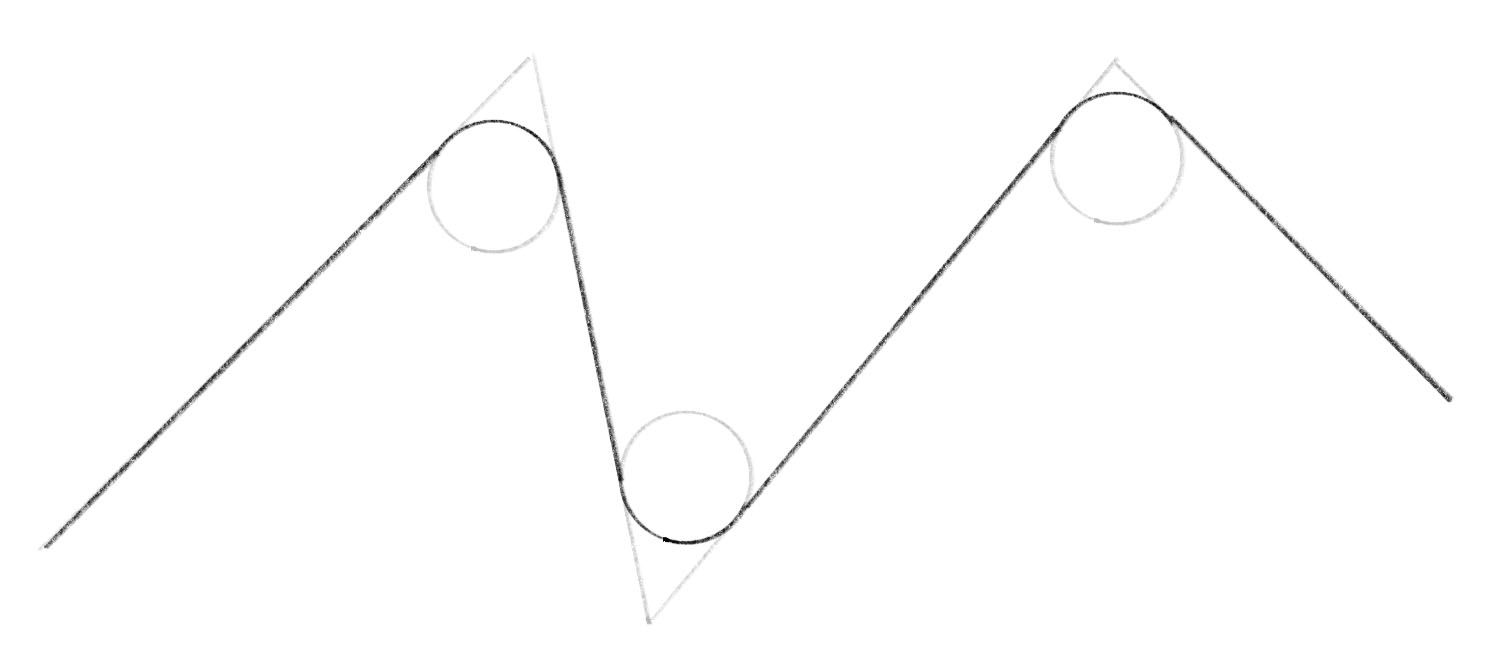
To find the position of the circle, you can draw a line through the corner and the center of the circle, and perpendicular lines from the center to the sides. Then you can find two congruent right triangles.
円の位置を求めるには、角と円の中心を通る直線と、中心から両側の線に垂直な線を引くと、2つの合同な直角三角形を見つけることができます。
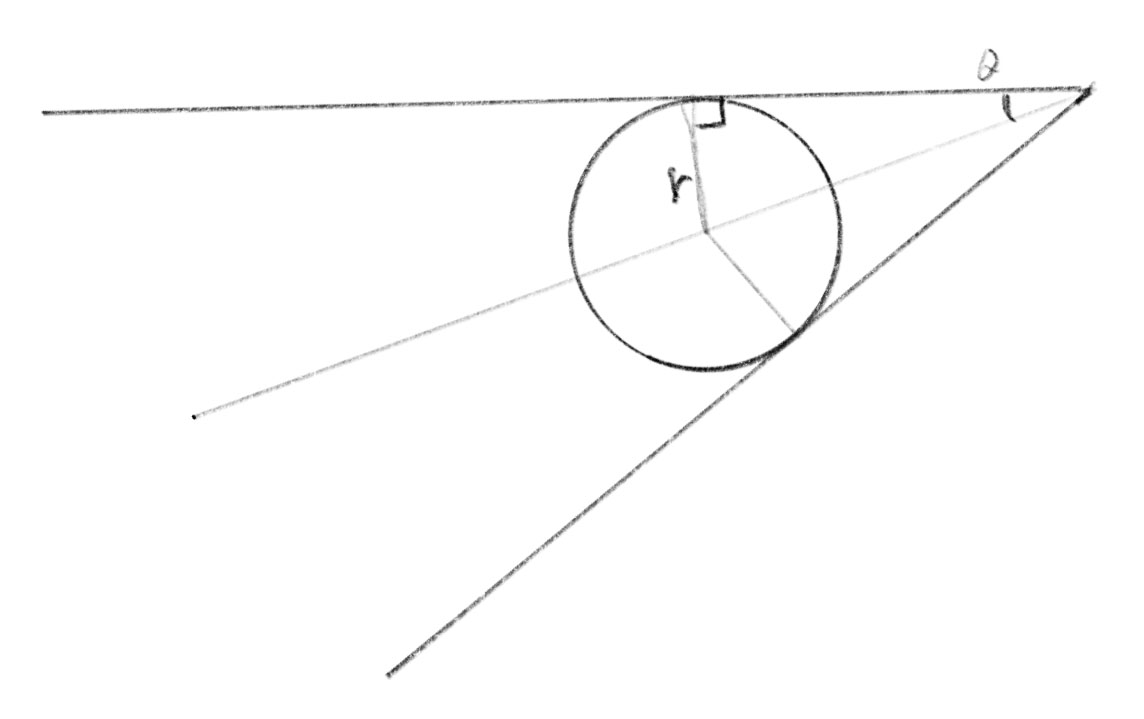
The distance from the corner to the points where the circle touches is:
角から円と両側の線の接点までの距離は次のように求められます。
The distance from the corner to the center is:
角から円の中心までの距離は次のようになります。
To draw this in p5.js, we could use arc(). But instead, the RoundedCorner class in the demo below takes three points and the radius and creates an array of Cubic objects. This way, we can treat all the different curves discussed on this page just as arrays of the same object, making it easy to connect or mix them.
これをp5.jsで描くにはarc()関数が使えますが、下のデモのRoundedCornerクラスでは3つの点の半径をとって、Cubicの配列を作ります。こうすることで、このページで見てきたすべての異なる曲線を同じオブジェクトの配列として扱うことができ、繋げたり混ぜ合わせたりすることが簡単になります。
To support this, the Cubic class has two new functions added. The circularArc() function creates an approximation of a circular arc as a cubic Bézier, and the straightLine() function let us treat a straight line segment in the same way. Note that a cubic Bézier cannot produce a circular arc precisely, but the approximation is good enough for most of our graphical needs.
これを実現するために、Cubic クラスには2つの新しい関数を追加しました。circularArc() 関数は円弧の近似を3次ベジェ曲線として作成し、straightLine() 関数は直線部分的を同じ方法で扱えるようにします。3次ベジェ曲線は円弧を正確に再現できませんが、大抵のグラフィック目的には十分な近似ができます。
The implementation is based Chet Haase’s Medium post and the code for Android.
実装はChet HaaseがMediumに投稿した記事とAndroidのコードを元にしました。
Applying this to more complex shapes, you can create various rounded shapes that still feel geometric and well-controlled.
これをより複雑な形状に適用すれば、丸みがありながら、幾何学的でよくコントロールされた雰囲気の形を様々に作れます。
Smoothening of the rounded corners
丸めた角を滑らかにする
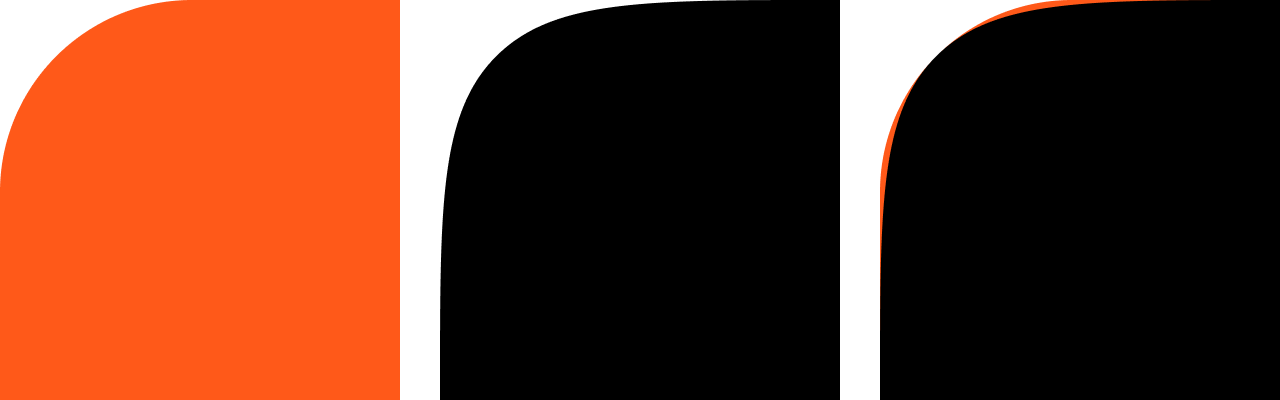
Rounded corners created in this way are not quite “smooth” in the sense that the curvature changes all of a sudden at the point the straight line meets the arc. If this were a road, you would need to steer the handle quite abruptly at the entrance and exit of the curve. To ease this, Apple introduced smoothing to the rounded corners in their design (To be fair, smoothed curves have been used widely in industrial design where NURBs are standard, but Apple has put emphasis on the soft curve in their product design and introduced it to UI language too). The Android’s shape library has an approximation of this too. Take a look at the code if you are interested.
この方法で作った角の丸みは、直線が弧に接する点で曲率が突然変化するという意味であまり「滑らか」ではありません。これが道路であれば、カーブの入り口と出口でかなり急にハンドルを回す必要があります。これを緩らげるために、Appleは角の丸みにスムージングを導入しました(公正を期すと、NURBsが標準とされる工業デザインではすでに幅広くスムーズな曲線が使われていましたが、Appleは製品デザイン上で柔らかいカーブを強調し、UI言語にも取り入れました)。AndroidのShapeライブラリにも似たものが実装されています。興味がある場合は、コードを見てみてください。
To Learn More
さらに学ぶために
Curves are a vast and fascinating topic with infinite ways to draw them. We’ve covered just a few mathematical methods here. For more, D3.js’s functions are a great starting point. The code is easily accessible on GitHub and relatively simple to understand.
曲線は、広大で魅力的なテーマで、その描き方も無数にあります。ここでは、いくつかの数学的な方法について説明しました。さらに詳しく知りたい方は、D3.jsの関数がとても良い出発点になるでしょう。コードはGitHubで簡単にアクセスでき、比較的理解しやすくなっています。
But curves aren’t just about math. They’re also about aesthetics and functionality. Artists and designers have spent so much effort creating curves that are visually or tactually pleasing or express various ideas. Studying great works can teach us a lot about curves. For instance, you might be interested in how Raymond Loewy’s streamlined design reflected the fascination with progress and efficiency of the era, or you might want to explore how to emulate Ellsworth Kelly’s soft rounded shapes with code. You could also explore topics like the design of roads and roller coasters, aerodynamics, or use of parametric approach in architecture and industrial design.
しかし数学だけが曲線ではありません。曲線は美観や機能性にも関わっています。アーティストやデザイナーは、視覚や触覚に訴えたり、さまざまなアイデアを表現するための曲線を得るために、多くの努力を払ってきました。すぐれた作品について研究すれば、曲線について多くを学べます。例えば、レイモンド・ローウィの流線型デザインがその時代の進歩や効率性へ憧れをどう反映しているか考えたり、エルスワース・ケリーの柔らかい丸みを帯びた形をコードで模倣する方法を探しても良いでしょう。道路やジェットコースターのデザイン、空気力学、あるいは建築や工業デザインにおけるパラメトリックなアプローチの使われ方などについて調べても面白いでしょう。
The video below is a showcase of brushstrokes made with various methods, including the techniques we discussed on this page.
下のビデオは、このページで議論した技法など、様々な方法で作られた筆のストロークの見本です。