Reading a Noise Function
On this page, we are going to read a simple noise function. Noise functions are one of the most common tools in computer graphics to create complex or realistic patterns like this landscape. Because they are so common, many tools and frameworks give us various implementations of noise functions for free, and we tend to take them for granted without having to understand how they work.
このページでは、シンプルなノイズ関数について解説していきます。ノイズ関数は、この風景のように複雑でリアルなパターンを生成するために使える、コンピューターグラフィックスの基本的なツールの1つです。その汎用性の高さから、多くのツールやフレームワークでは様々なノイズ関数が標準で実装されていて、原理を理解しなくても当たり前のように使うことができます。
For writing this page, I asked an AI to read the example and directly quote the explanations. AI can be a great tool to help you learn, rather than a black box that makes people dumb.
このページではAIにサンプルを読ませ、その説明を直接引用しました。AIは、人々を考えなくするブラックボックスではなく、学習を助ける優れたツールになりえます。
This page (or all of my articles in general) is written for someone like me, who is more visually and scrappy prototyping oriented rather than a trained programmer or mathematician.
このページ(他の記事も)は、コンピューターサイエンスの学位を持つような専門的な技術者や数学者ではなく、自分を含めた見た目やざっくりとしたプロトタイピングを優先する人向けに書かれています。
1D noise function
1Dのノイズ関数
This is our sample code (written by AI as well). It is a simple value noise function that takes a float number as input and returns another float number.
これがサンプルコードです(これもAIが書きました)。これは単純なバリューノイズ関数で、浮動小数点数を入力として受け取り、別の浮動小数点数を返します。
float hash(float n)
{
    // Deterministic pseudo‑random number in [0,1)
    return fract(sin(n) * 43758.5453123);
}

float noise(float x)
{
    // Integer lattice points on either side of x
    float i0 = floor(x);
    float i1 = i0 + 1.0;

    // Fractional position within the cell
    float f  = fract(x);

    // Hash values at the two endpoints
    float a = hash(i0);
    float b = hash(i1);

    // Smoothstep weight for C¹ continuity
    float u = f * f * (3.0 - 2.0 * f);

    // Linear interpolation
    return mix(a, b, u);
}
The first step is to visualize the function. The demo below maps the horizontal axis to the range of x=0.0 to x=10.0. The vertical axis, or the height of the white area, represents the return value in the range of 0.0 to 1.0.
まずは関数を可視化してみましょう。下のデモは、横軸がx=0.0からx=10.0の範囲に対応します。垂直軸、つまり白い領域の高さは、0.0から1.0の範囲での戻り値を表しています。
Lattice points
格子点
Let’s break it down. Ok AI, what are the first two lines doing.
分解して見ていきましょう。AIに、最初の2行が何をしているのか聞いてみます。
    float i0 = floor(x);
    float i1 = i0 + 1.0;
This lines are splitting the input
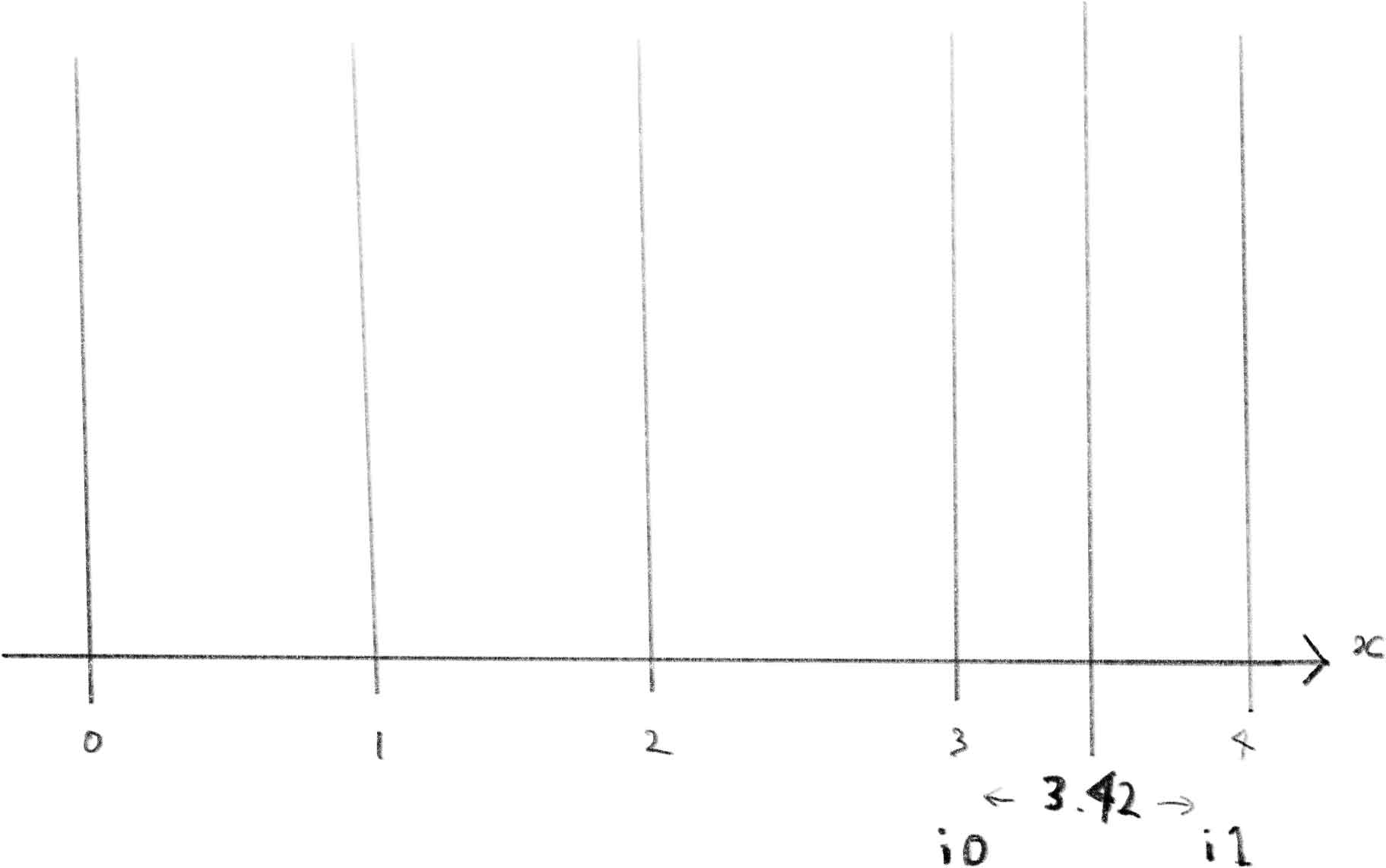
xinto two adjacent integer lattice points that define the “cell”xis inside.Let’s say
x = 3.42.i0 = floor(3.42); // → 3.0 (left end of the interval) i1 = i0 + 1.0; // → 4.0 (right end of the intervalSo
xis somewhere betweeni0 = 3andi1 = 4.この行は入力値の
xを、その値を含む「セル」を定義する隣接する2つの整数格子点に分割します。
x = 3.42とした場合を例に見てみましょう。i0 = floor(3.42); // → 3.0 (区間の左端) i1 = i0 + 1.0; // → 4.0 (区間の右端)つまり
xはi0 = 3とi1 = 4の間のどこかにあるということです。
In other words, i0 is the integer number to the left of x and i1 is to the right.
言い換えると、i0はxの左側にある整数の値で、i1は右側にある整数の値です。
It also helps to sketch on paper your understanding as you go.
理解を助けるために、紙にスケッチしながら進めていくと良いでしょう。
Fractional part
小数部分
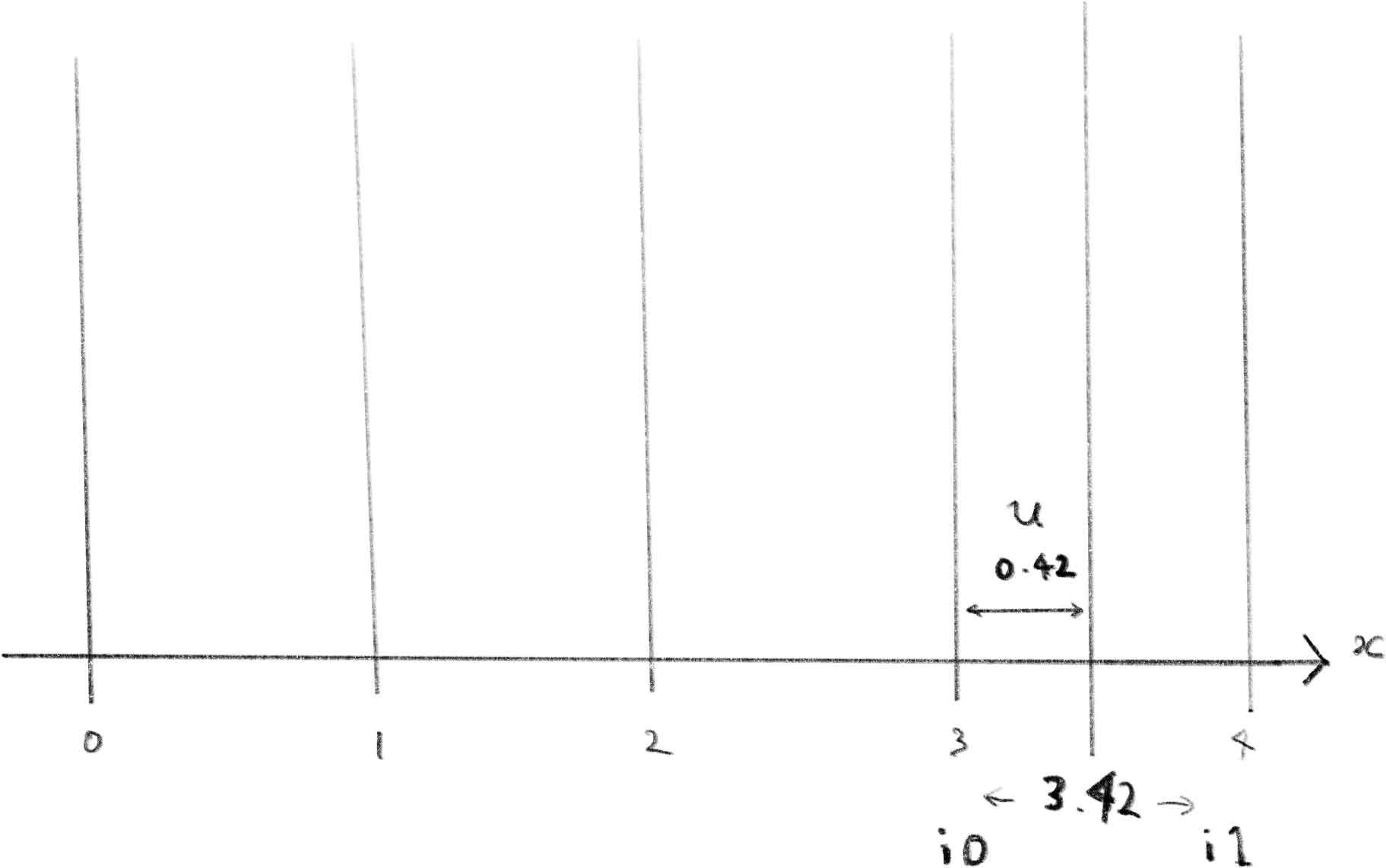
This line extracts the fractional part of
x. In other words, it gives you how farxis between the two integer lattice points:
If
x = 3.42:i0 = floor(3.42); // 3.0 f = fract(3.42); // 0.42So
f = 0.42tells you thatxis 42% of the way fromi0toi1.この行は
xの小数部分を抽出します。つまり、2つの整数格子点の間でのxの位置を示します:
x = 3.42の場合:i0 = floor(3.42); // 3.0 f = fract(3.42); // 0.42つまり
f = 0.42は、xがi0からi1までの間を42%進んだ位置にあることを示しています。
Hash
ハッシュ
    float a = hash(i0);
    float b = hash(i1);
The
hash()function in this code is a simple pseudo-random number generator.It turns a float input
n(usually an integer) into a repeatable random-looking value between 0 and 1.
sin(n)maps the numbernto a float between –1 and 1, in a nonlinear way.Multiply by a big constant (
43758.5453123) to spread out the result—this gives a wide range of outputs.
fract(...)takes the fractional part, so the final value is between 0 and 1.この
hash()関数はシンプルな疑似乱数生成器です。nという浮動小数点数の入力(通常は整数)を、0から1の間の再現可能な乱数のような値に変換します。
sin(n)は数値nを非線形的に-1から1の間の浮動小数点数に変換します。大きな定数(
43758.5453123)を掛けることで結果を広く分散させ、幅広い出力値を得ています。
fract(...)は小数部分を取り出すので、最終的な値は0から1の間になります。
So it is basically a pseudo-random function. Then:
つまりこれは疑似的な乱数関数というわけです。
These two lines:
float a = hash(i0);
float b = hash(i1);
generate pseudo-random values at the two neighboring integer lattice points—
i0andi1—that surround the inputx.Let’s say your input is
x = 3.42:i0 = floor(x); // → 3.0 i1 = i0 + 1.0; // → 4.0Then:
a = hash(3.0);      // → random value at the left end of the cell
b = hash(4.0);      // → random value at the right end of the cell
These values
aandbare not truly random, but they look random and are always the same for the same input. That’s becausehash()is a deterministic pseudo-random function.
The AI rightly touched upon a very important point. The hash function returns exactly the same value for the same input. Because a shader runs its processes in parallel for each pixel, we want the return values of the functions to be consistent across all the processes.
AIはとても大事な点を指摘してくれました。ハッシュ関数は同一の入力に対して必ず同じ値を返します。シェーダーは各ピクセルで並列に処理を実行するため、すべての処理で関数の戻り値が一貫している必要があります。
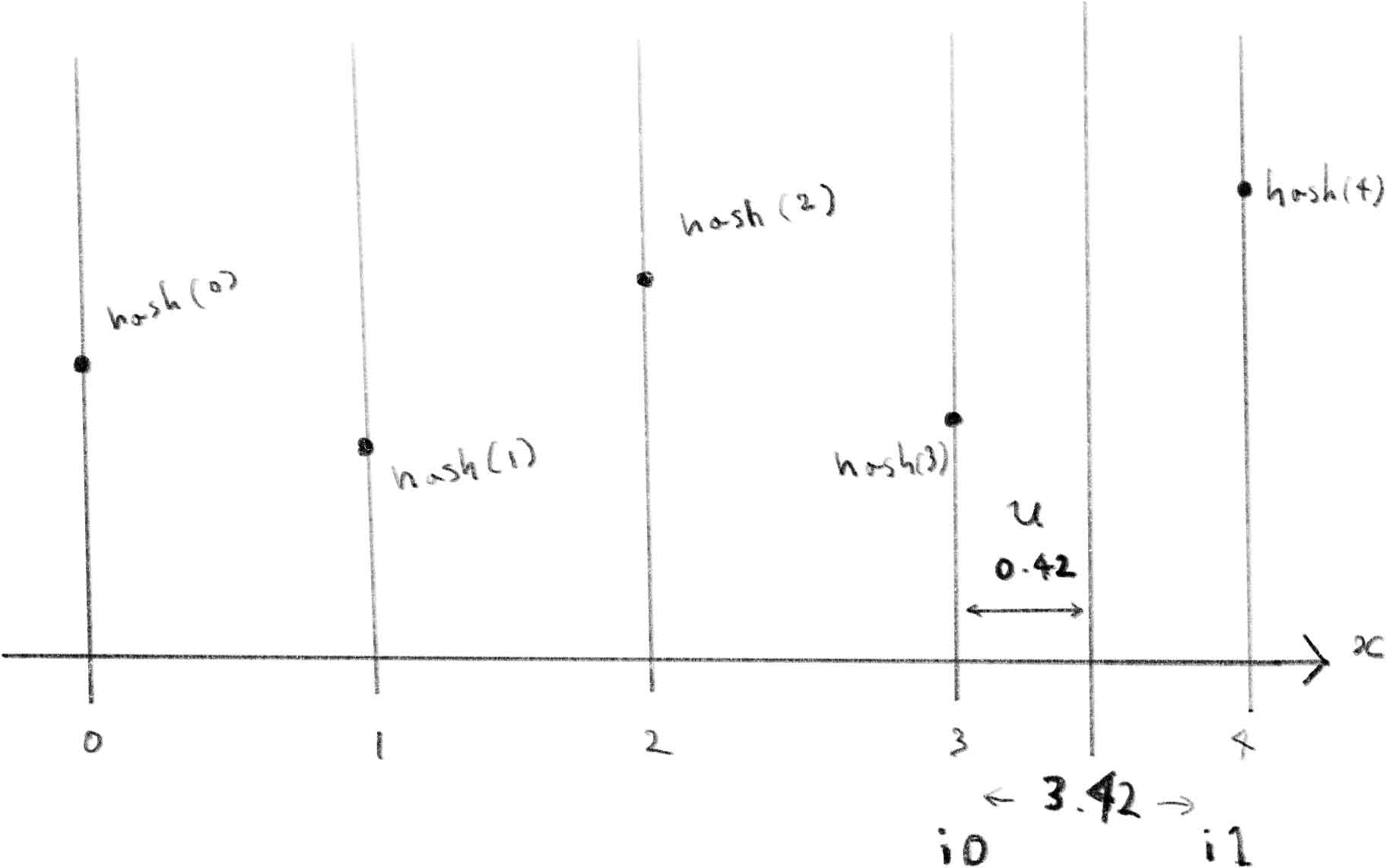
Here is the visualization of the hash function.
下はhash関数を可視化したものです。
Smoothstep and C¹ continuity
スムースステップとC¹連続性
float u = f * f * (3.0 - 2.0 * f);
This line computes a smooth interpolation weight using a smoothstep function.
This is a classic cubic Hermite polynomial, often called smoothstep:
It maps the input f (from 0 to 1) to another number in [0, 1], but with smoothed acceleration at the ends. That means:
-
u = 0whenf = 0 -
u = 1whenf = 1 -
Derivative is 0 at both ends → no sharp corners or sudden jump
If you just used mix(a, b, f) with a linear weight, the transition between a and b would be continuous but not smooth—you’d get noticeable slope changes.
Using this u instead gives you C¹ continuity—both value and slope are smooth across intervals.
That’s why it’s widely used in value noise, animation easing, and procedural shading.
この行はスムースステップ関数を使用して滑らかな補間の重みを計算します。
これは三次エルミート多項式の典型的な例で、スムースステップとも呼ばれています:
この関数は入力値f(0から1の範囲)を[0, 1]の範囲の別の数値に変換しますが、両端で加速度が滑らかに変化します。つまり:
-
f = 0のときu = 0 -
f = 1のときu = 1 -
両端で導関数が0となる → 急激な変化や不連続な飛びがない
もし線形の重みでmix(a, b, f)を使用した場合、aとbの間の遷移は連続的ではあるものの滑らかではなく、傾きの変化が目立ってしまいます。
代わりにこのuを使用することでC¹連続性が得られ、値と傾きの両方が区間全体で滑らかになります。
そのため、この関数はバリューノイズ、アニメーションのイージング、プロシージャルシェーディングで広く使用されています。
This is a visualization of the function. You can ask AI more about what C¹ continuity means, or the following page explains more about the concept of continuity.
下はこの関数を可視化したものです。C¹連続性の意味についてさらにAIに聞いても良いですし、連続性については下記のページでも少し解説しています。
Linear interpolation
線形補間
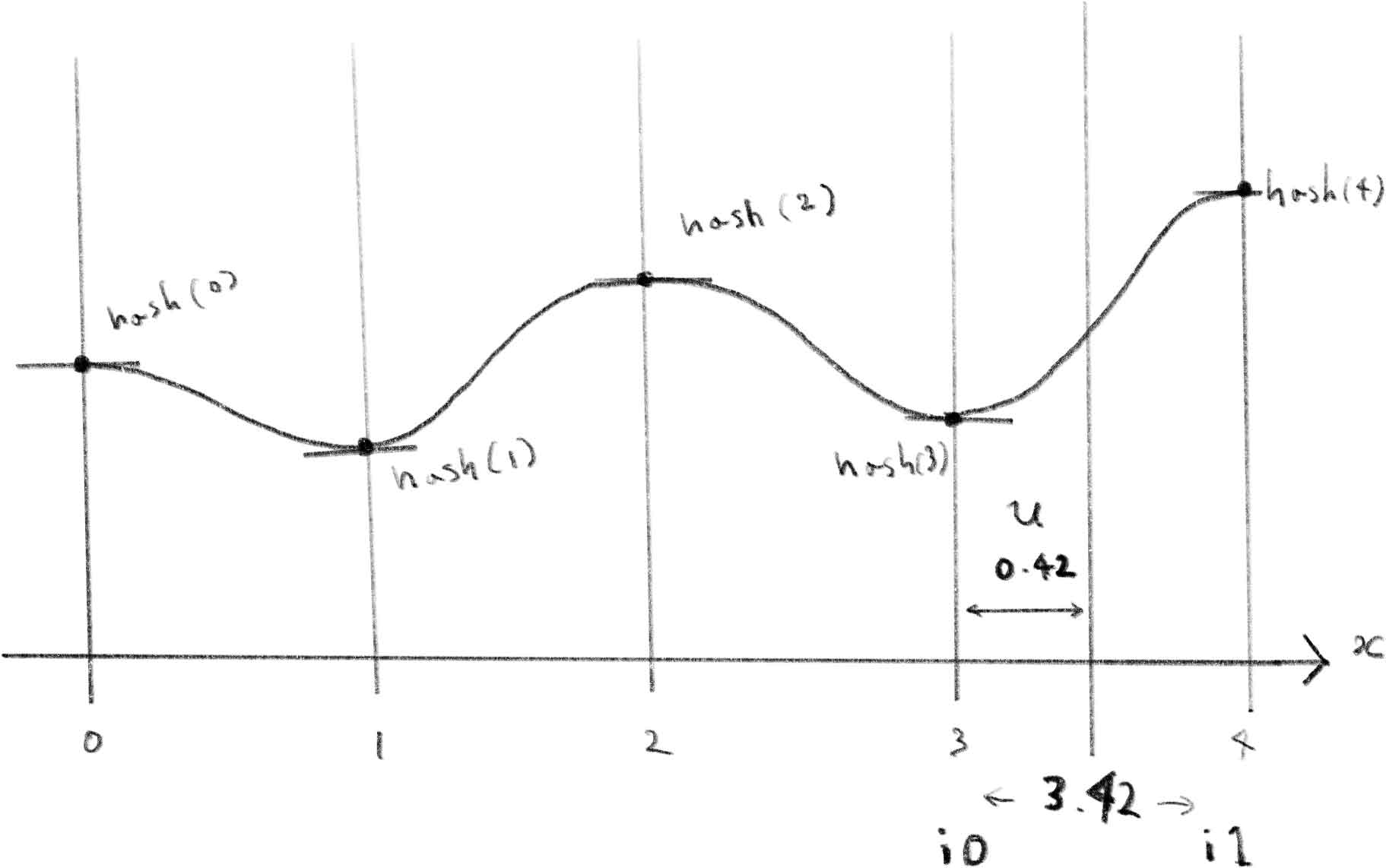
The last part is just to interpolate the two random values with u to smoothly connect them.
最後の部分は、2つのランダムな値なめらかに繋げるためにuを使って補間しているだけです。
return mix(a, b, u);
Here is the final picture of my understanding of the code.
下の図がコードについての最終的な理解を示したものです。
How was it? I hope this gave you a small taste of what it’s like to read and understand code. If you feel comfortable with the simple noise function, try reading this slightly more advanced version from Drawing Landscape.
どうだったでしょう。コードの読み方について何か掴めたでしょうか。このシンプルなノイズ関数に慣れたら、Drawing Landscapeから、もう少し進化したこのバージョンにも挑戦してみてください。
vec3 noised(in vec2 st) {
    vec2 i = floor(st);
    vec2 f = fract(st);

    float a = random(i);
    float b = random(i + vec2(1.0, 0.0));
    float c = random(i + vec2(0.0, 1.0));
    float d = random(i + vec2(1.0, 1.0));

    vec2 u = f * f * (3.0 - 2.0 * f); // smoothstep(f)
    vec2 du = 6.0 * f * (1.0 - f);    // derivative of smoothstep(f)

    float value = mix(a, b, u.x) +
                  (c - a) * u.y * (1.0 - u.x) +
                  (d - b) * u.x * u.y;

    float dx = (b - a) * du.x * (1.0 - u.y) +
               (d - c - b + a) * du.x * u.y;

    float dy = (c - a) * du.y * (1.0 - u.x) +
               (d - b - c + a) * du.y * u.x;

    return vec3(value, dx, dy);
}