Interpolation and Animation 補間とアニメーション
Linear Interpolation
線形補間
In animation, it is a common practice to create movement by determining the beginning and ending positions and filling in the gaps between them. This method is called interpolation.
アニメーションでは始まりの位置と終わりの位置を決めてその間を補うことで動きを表現する手法がよく用いられます。これは補間と呼ばれます。
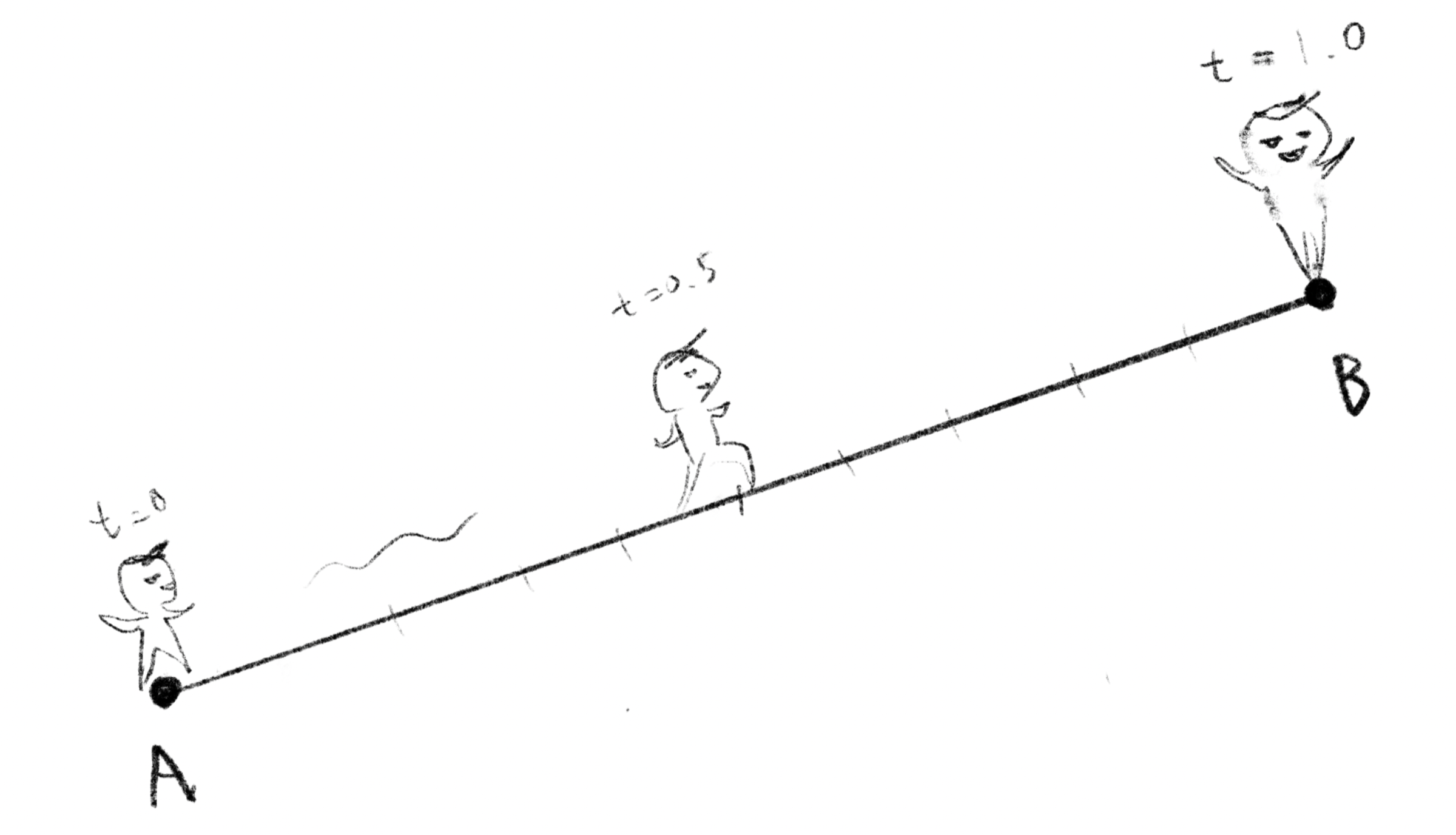
Suppose that point moves from one point to another point , and the variable is the ratio how much has moved between them. If , is in the same position as . If , is in the same position as , and if , is exactly at the midpoint between and . This can be expressed as follows. , , and can be either numbers or vectors.
ある点から別の点まで点が移動するとします。の移動した割合をという変数で表します。 ならはと同じ位置、 ならはと同じ位置、 ならはちょうどとの中点にいるという具合です。これは下記のように表せます。, , は数値でもベクトルでも構いません。
when changes at a constant rate as in this demonstration, it is called linear interpolation.
このデモのようにが等速度で変化する場合を線形補間と呼びます。
Easing functions
イージング関数
We can make the animation more expressive by manipulating the way changes. For example, let’s look at what happens if we square the value of . This produces a movement that starts out slow and gradually accelerates.
の変化を操作するとアニメーションに表情を持たせることできます。例えばtの値を2乗してみましょう。これだけでゆっくりとしたスタートから徐々に加速する動きができました。
function powerInSquare(t) {
    t = max(0, min(t, 1));
    return pow(t, 2);
}
We can think of various functions for changing the way values are interpolated. These are called easing functions. Let’s plot some of the well-known examples.
値の補間方法を変えるための関数には様々なバリエーションが考えられます。これらの関数をイージング関数と呼びます。よく知られているものをいくつかグラフに描いてみましょう。
Interpolating Interpolations
補間の補間
To sketch something more intricate, we can create interesting movements and shapes by further interpolating between points that are also moving with interpolations.
もっと複雑なスケッチを描きたければ、補間によって動く点どうしの間をさらに補間すると面白い動きや形を作ることができます。
Bezier curves
ベジェ曲線
Bezier curves that you might be familiar with in drawing softwares such as Adobe Illustrator are actually made of (linear) interpolations. There are variations depending on how many interpolations are combined.
イラストレーターなどのドローイングソフトでお馴染みのベジェ曲線も実は(線形)補間を組み合わせた物です。補間をいくつ組み合わせるかによって種類があります。
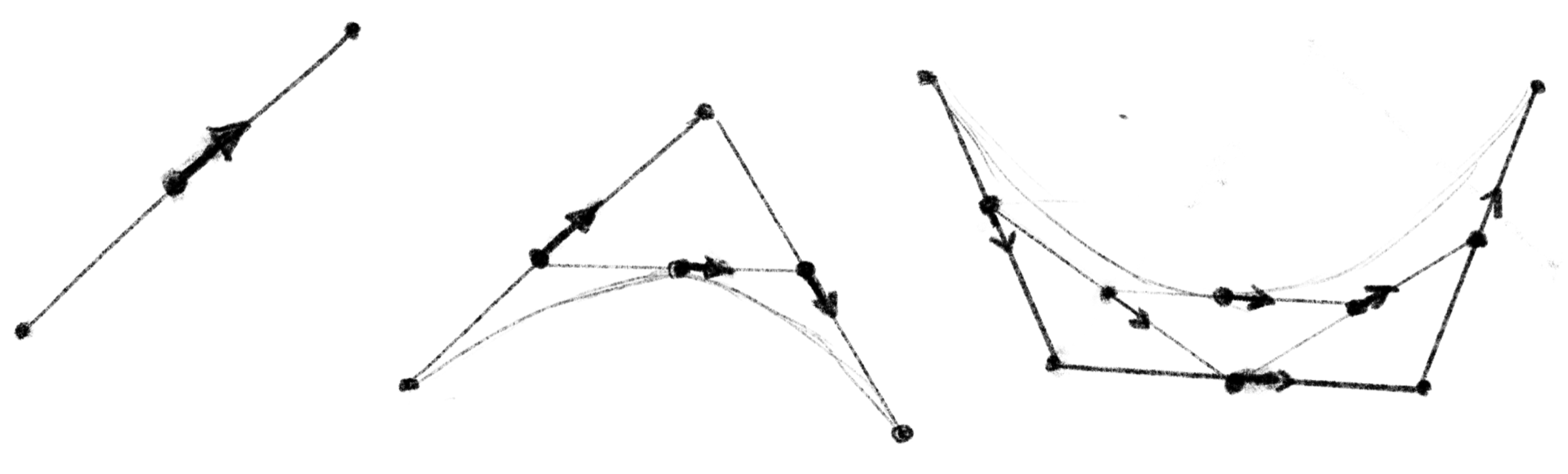
A linear Bézier curve is simply a straight line between two points, which can be defined as linear interpolation between two points.
線形ベジェ曲線は単に2点の間の直線のことで、その2点間の線形補間として定義できます。
A quadratic Bézier curves can be defined as linear interpolation between corresponding points on two linear Bézier curves.
2次ベジエ曲線は、2本の線形ベジェ曲線上の対応する点間の線形補間として定義することができます。
And a cubic Bézier curves is linear interpolation between corresponding points on two quadratic Bézier curves.
そして3次ベジエ曲線は、2本の2次ベジエ曲線上の対応する点間の線形補間です。
Although it may seem circular, defining an easing function using Bezier curves allows you to control the animation more freely.
循環する様ですが、ベジェ曲線を使ってイージング関数を定義するとより自由にアニメーションをコントロールできます。
Coordination Motion
動きの協調
Easing can be used in combination to achieve a great variety of expressions. We could spend several chapters just exploring this topic, but for now I will just list a few examples.
イージングをうまく組み合わせることでより様々な表現を実現できます。この話はそれだけで何章か書けてしまいそうですが、とりあえずいくつかの例だけを並べておきます。

This is an example in the Motion ToolKit section I wrote for the Book of Shaders a long time ago. All the elements are moving independently with the easing functions introduced above, but by coordinating the timing and positions, they can appear to be related to the others.
これは遠い昔にBook of ShadersのMotion Tool Kitのために書いた作例です。全ての要素は上で紹介したイージング関数よってバラバラに動いていますが、タイミングや位置の関係を工夫するとそれぞれの動きに関連があるように見せることもできます。
Little elements such as a small bounce and deformation can convey the weight and material of an object. Don’t they look like a heavy material like metal on the left and a light rubber ball or some living creature on the right? I was a little slacking on the shape just morphing the circle into an oval, but you could be more creative, for example, to change the shape differently between the upper half and the lower half that is pressed onto the ground.
小さなバウンドや形の変形といったちょっとした要素で物の重さや材質を伝えることもできます。左は金属のような重い材質、右は軽いゴムボールか生き物のように見えないでしょうか。形の変化は手を抜いて円を楕円形に潰しているだけですが、上半分と下側の地面に押されている側で形を変えたりと、もっと工夫することができます。
This is an example of connecting line movements. I don’t remember the details, but it is an attempt to create complex-looking movements by just joining simple motifs of straight lines and arcs with the right timing.
これはいくつもの線の動きを繋げた作例です。細かいことは忘れましたが、直線と円弧の単純なモチーフをタイミングを合わせて繋ぎ合わせるだけで複雑そうな動きを作り出す試みです。